 E-CommerceGenerative AI in Online Retail: Uses That Pay BackGenerative AI ecommerce uses ranked by payback and risk: product descriptions, AI search and support assistants, plus Arabic quality checks for UAE stores.
PrestaShop vs WooCommerce: Which Should You Choose?
PrestaShop vs WooCommerce compared on features, cost drivers, ease of use, performance, security, SEO and support, plus a simple way to choose.
Choose WooCommerce if you want the widest choice of themes, plugins and developers, or if content marketing through WordPress matters to your store. Choose PrestaShop if you want a dedicated commerce application with multiple languages, currencies and stores available in the core. Both are free, open source and written in PHP, so the real differences are in ecosystem, ease of use and how much you depend on add-ons.
This comparison covers features, drawbacks, cost drivers, setup, usability, performance, security, extensibility, SEO and support, so you can match the platform to your store.
PrestaShop in brief
PrestaShop is a standalone open source ecommerce platform with its own admin, themes and module system. You download it from PrestaShop's official site and host it yourself, and its developer documentation lives on the PrestaShop project devdocs.
Strengths
- Commerce first: catalogs, customers, orders, carriers and promotions are core features rather than add-ons.
- International selling: multiple languages and currencies are built in, which helps stores selling across borders.
- Multistore: several shops can be managed from one installation.
- Detailed catalog tools: product combinations, features, attributes and price rules are part of the admin.
Drawbacks
- A smaller ecosystem and developer pool than WordPress.
- Many useful modules are paid, so advanced functionality can add up.
- Content tools such as blogging are weaker than WordPress without modules.
- Major version upgrades can break themes and modules, so they need planning.
WooCommerce in brief
WooCommerce is a free plugin that adds a store to a WordPress site, available from the WordPress.org plugin directory. Everything WordPress offers, including its editor, themes, plugins and hosting options, applies to your store.
Strengths
- Huge ecosystem: themes and extensions exist for almost every feature, from subscriptions to bookings.
- Content and commerce together: blog posts, guides and landing pages sit next to products.
- Flexibility: developers can change almost any behavior through hooks and the REST API.
- Large talent pool: WordPress developers and agencies are easy to find.
Drawbacks
- A lean core means many features arrive through plugins, each with its own updates.
- Too many plugins can slow the site and create conflicts.
- Multilingual, multi-currency and multistore setups need extra extensions.
- Store owners are responsible for hosting, updates and security.
PrestaShop vs WooCommerce at a glance
| Factor | PrestaShop | WooCommerce |
|---|---|---|
| Software | Standalone ecommerce platform | Plugin for WordPress |
| License | Free, open source | Free, open source |
| Languages and currencies | Built in | Via extensions |
| Multistore | Built in | Via extensions or separate sites |
| Content and blogging | Basic, extended by modules | Excellent through WordPress |
| Ecosystem size | Moderate | Very large |
| Best fit | Catalog heavy stores selling in several languages | Content led brands and stores needing flexibility |
Detailed comparison
What drives cost
Both platforms are free to download, so the budget goes elsewhere. For PrestaShop, the main drivers are hosting, a theme and paid modules for features such as advanced shipping, marketplace connectors or one page checkout. For WooCommerce, they are hosting, a theme and premium extensions with yearly renewals. On both, custom development and ongoing maintenance are usually the largest items. Price out your specific feature list on each platform rather than comparing headline costs.
Installation
PrestaShop installs through its own installer, which sets up the database, store name, country and admin account. Many hosts also offer one click installs. WooCommerce installs from the WordPress dashboard in a few clicks, then a setup wizard covers store details, payments, shipping and tax. If you already run WordPress, WooCommerce is faster to get going.
Ease of use
PrestaShop's admin is organized around commerce: catalog, orders, customers, shipping and modules. Store owners who only sell products may find it focused and logical. WooCommerce feels natural to anyone who has used WordPress, and editing pages and products in one place is a real advantage. Neither is difficult for routine tasks, but both need a developer for custom layouts and complex features.
Scalability and performance
Both can run large stores with proper hosting, caching and a content delivery network. PrestaShop's built-in features mean fewer add-ons for international stores. WooCommerce performance depends heavily on theme quality and the number of plugins. In both cases, database tuning, image optimization and caching matter far more than the platform choice.
Security
Both are secure when kept updated. PrestaShop releases updates and security fixes for its core, and modules must be updated too. WooCommerce security depends on WordPress core, WooCommerce and every plugin being patched, plus good hosting. On either platform, use trusted add-ons only, keep backups, enable strong admin passwords with two-factor sign in, and take payments through a PCI compliant gateway.
Extensibility
PrestaShop extends through modules and themes, many sold on its official addons marketplace. WooCommerce extends through the WooCommerce marketplace and the wider WordPress plugin directory, which is far larger. Developers can customize both deeply, but more off-the-shelf options exist for WooCommerce, and more developers know how to build for it.
Marketing and SEO
PrestaShop includes friendly URLs, meta fields and basic promotion tools such as cart rules and catalog price rules. WooCommerce benefits from WordPress's content tools and mature SEO plugins that handle metadata, sitemaps and schema. For brands that grow through content, guides and blog posts, WooCommerce has a clear edge.
Support
PrestaShop has official documentation, community forums and paid support options. WooCommerce has extensive documentation, the large WordPress community and vendor support for paid extensions. With either, most real support comes from your developer or agency, so choose a team that knows the platform well.
How to choose
- Start with markets. Selling in several languages and currencies from day one favors PrestaShop, though WooCommerce handles it well with the right extensions.
- Weigh content. If blog posts, guides and landing pages drive your traffic, WooCommerce is the stronger choice.
- List required features. Check which ones are built in on PrestaShop and which need paid add-ons on each platform.
- Check local integrations. Make sure your payment gateways, couriers and accounting tools have maintained connectors.
- Consider who will maintain it. A larger developer pool makes WooCommerce easier to staff over time.
For real examples, see the bilingual Ghezlan WooCommerce store and the Clock Springs Australia parts catalog. If you are undecided, a platform fit review tests your requirements against both. Codeeo has delivered 200+ projects across the UAE and the US, and our WooCommerce developers build and move stores, including site migration from other platforms.
Frequently asked questions
WooCommerce is usually easier if you have used WordPress, because products, pages and settings live in one familiar dashboard and a setup wizard guides the first steps.
PrestaShop's admin is focused on commerce and is logical once learned, but it is a separate system with its own conventions. For someone new to both, the deciding factor is often which one their developer knows best.
E-CommerceGenerative AI in Online Retail: Uses That Pay BackGenerative AI ecommerce uses ranked by payback and risk: product descriptions, AI search and support assistants, plus Arabic quality checks for UAE stores.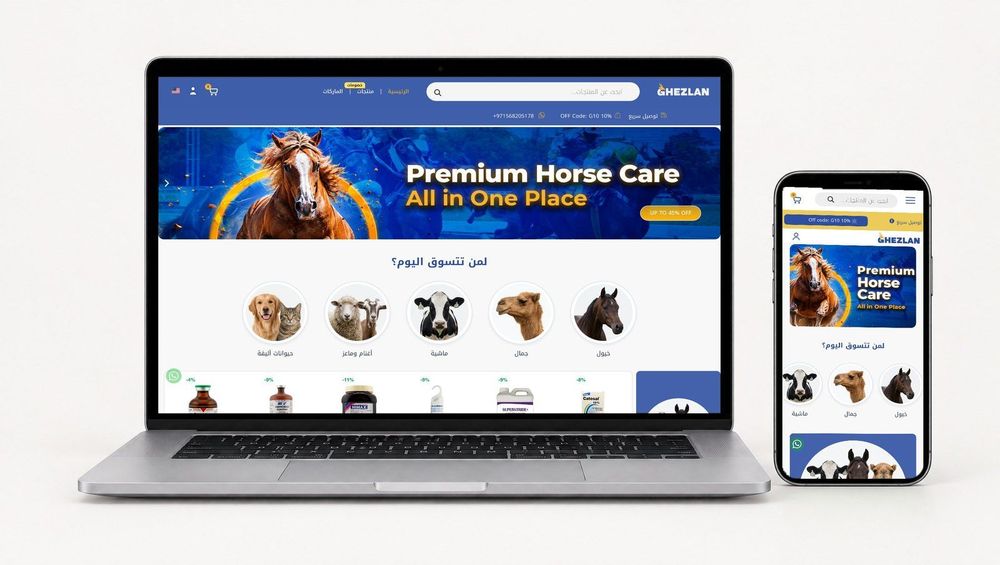 E-CommerceConnecting WooCommerce to ERP, CRM and Shipping Without DuplicatesPlan a WooCommerce ERP integration that avoids duplicates: data ownership rules, idempotent order sync, CRM matching and UAE shipping, with Odoo and Dynamics.
 E-CommerceEnterprise Ecommerce Platform Selection: Requirements Before DemosChoose an enterprise ecommerce platform by setting integration, multi entity, data residency and order management requirements before any vendor demo starts.
Tell us what the business needs. We will tell you what to build first.
Schedule a free consultation and get a written recommendation, with costs, before you commit to anything.
Get in touchPROVEN RESULTS
4.7 / 5verified reviews on Google