 Web DevelopmentWordPress Website Cost in Saudi Arabia: What Shapes Design, Development and Maintenance CostsWhat shapes the cost of a WordPress website in Saudi Arabia: design, plugins, Arabic and RTL, WooCommerce, hosting, security and maintenance.
AI Plugins for WordPress: What They Do Well and Where to Be Careful
What AI plugins for WordPress do well, where to be careful with privacy and speed, and when a custom AI integration is the better option.

AI plugins for WordPress are good at speeding up routine work such as drafting text, writing image alt text, answering common visitor questions and improving on site search. They are weaker on accuracy, Arabic quality and data privacy, and many of them slow a site down if installed carelessly. For a Saudi business, the right approach is to pick a small number of plugins for clear jobs, check where visitor data goes, and measure the effect on speed before and after.
This guide explains the main categories of WordPress AI tools, what each one does well, where the risks sit, and when a custom AI integration makes more sense than another plugin. It is written for business owners, marketing heads and IT teams in Riyadh, Jeddah and Dammam who run WordPress sites and want practical answers rather than hype.
What AI plugins for WordPress actually do
Most AI plugins are thin layers between your WordPress dashboard and a large language model or vision model hosted by a third party. The plugin sends a prompt, receives a response, and places that response into a post, a product description, a chat window or a settings field. A smaller group runs processing on your own server or uses a dedicated service for one narrow task such as image compression or spam filtering.
Understanding this matters because it shapes three things buyers often overlook: where your content and visitor data travel, what you pay for usage outside the plugin licence, and how much extra code loads on every page.
The main categories
- Content assistance: drafting outlines, rewriting paragraphs, summarising long pages and suggesting headings inside the block editor.
- Chat assistants: a chat window on the front end that answers visitor questions, often trained on your pages, FAQs or product catalogue.
- Search: replacing the default WordPress search with semantic search that understands intent and spelling variations.
- Image alt text and media: generating descriptions for images, tagging media libraries and suggesting crops.
- Translation: machine translation of pages and products between English and Arabic, sometimes with a review workflow.
- SEO helpers: suggesting meta titles, descriptions, internal links and schema based on page content.
- Security: detecting suspicious logins, bot traffic and malicious requests using pattern recognition.
Well known names in this space include Jetpack AI Assistant from Automattic, and the AI features built into SEO plugins such as Yoast SEO and Rank Math. Feature sets change often, so check each vendor's current documentation rather than relying on a review written months ago.
Where WordPress AI helps most
WordPress AI earns its place when the task is repetitive, low risk and easy to check. A few examples show the pattern.
Alt text and media libraries
Many business sites have hundreds of images with empty alt attributes. Generating a first draft of descriptions saves real time, and a person can review them quickly. The output is short, easy to verify, and improves accessibility for screen reader users. For bilingual sites, check that Arabic alt text reads naturally rather than as a literal translation.
First drafts and rewrites
Content assistance is useful for turning rough notes into a structured draft, shortening long paragraphs or producing variations of a product description. It is not a substitute for subject knowledge. Every claim, price, specification and regulatory statement still needs a human check before publishing.
Answering repeat questions
A WordPress chatbot plugin can handle questions such as opening hours, delivery areas, return windows and service lists. It works best when it answers only from your own approved content and hands over to a person, often on WhatsApp, when the question goes beyond that content.
Smarter on site search
Default WordPress search matches keywords literally. Semantic search can understand that a visitor typing a product nickname or a misspelled Arabic term is looking for a specific item. For larger catalogues and knowledge bases this can make a real difference to how quickly people find what they need.
Where to be careful
The risks of an AI WordPress plugin are rarely obvious on the settings page. They show up later, in slower pages, wrong answers or data leaving the country without anyone noticing.
Accuracy and brand risk
Language models can produce confident text that is wrong. A chat assistant that invents a refund policy or quotes a service you do not offer creates a customer service problem and, in regulated sectors, a compliance one. Limit chat assistants to approved sources, set clear refusal rules, and review conversation logs regularly.
Arabic quality and RTL layout
Arabic output varies widely between tools. Some produce stiff Modern Standard Arabic that reads as machine written; others mix dialects or get gender agreement wrong. Chat widgets and editor panels may also break right to left layout, misplace punctuation or flip icons. Test every plugin on the Arabic version of the site with a native speaker before rollout.
Privacy and PDPL
Saudi Arabia's Personal Data Protection Law, overseen by SDAIA, sets rules on how personal data is collected, used and transferred. A chat plugin that sends visitor names, phone numbers or order details to an overseas AI provider is processing personal data, and that raises questions about consent, purpose and cross border transfer. Read the plugin's data handling documentation, check where the AI provider stores data, and update your privacy notice. The SDAIA website is the starting point for official guidance. Confirm your specific obligations with legal counsel or the regulator.
Performance impact
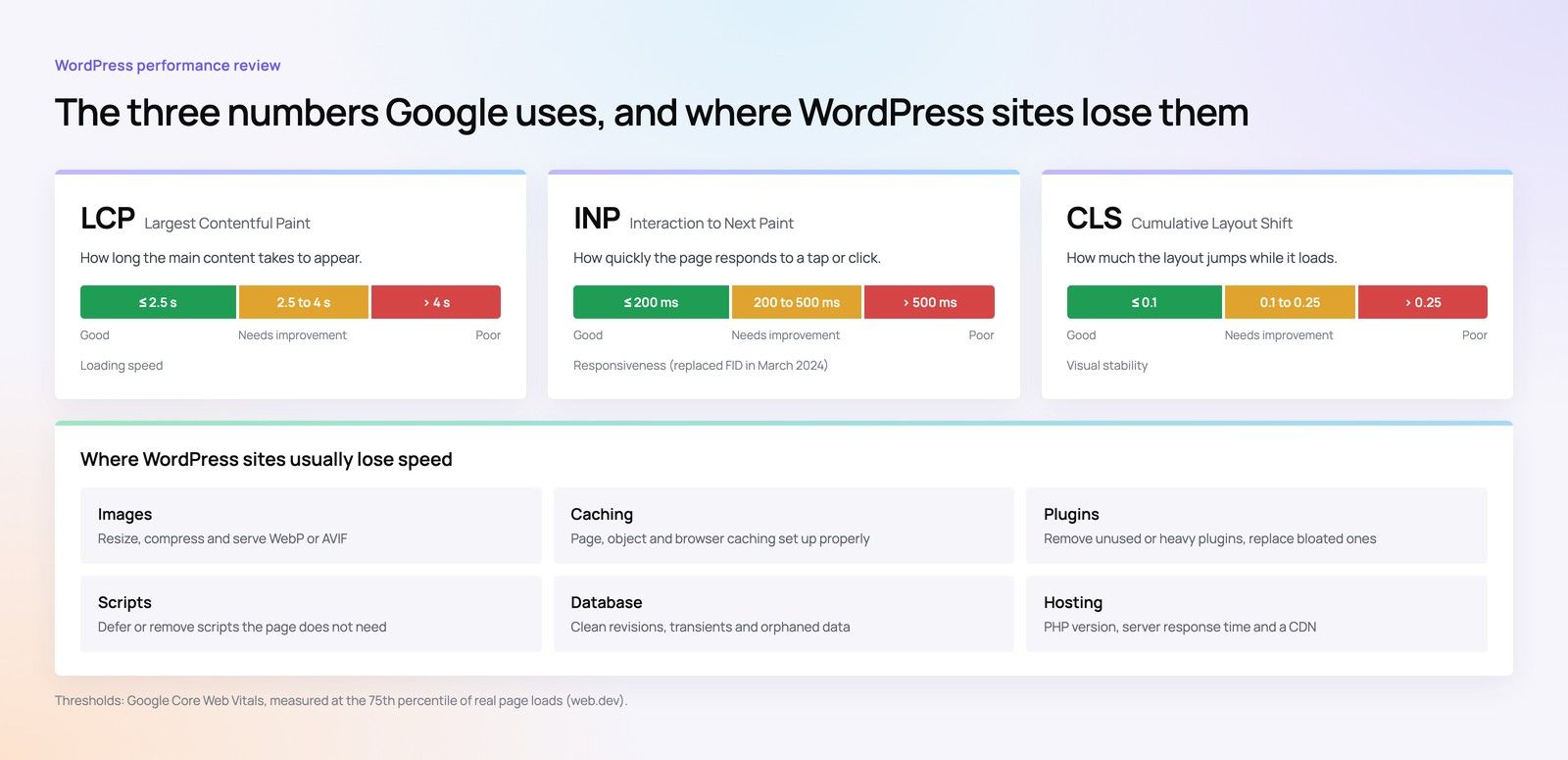
Chat widgets, front end search scripts and analytics add JavaScript, fonts and network requests. On mobile connections this can hurt Largest Contentful Paint and Interaction to Next Paint, two of the Core Web Vitals Google uses as page experience signals. Plugins that run on every admin page load can also slow the dashboard for editors.
Hidden running costs and lock in
Many plugins need an API key from an AI provider and bill per request or per token, separate from the plugin licence. Heavy chat or bulk generation can raise that bill quickly. Some plugins also store generated content or embeddings in their own format, which makes switching harder later. Ask how data is exported before you commit.
Security and plugin sprawl
Every plugin adds code that must be updated and monitored. AI plugins often hold API keys in the database, and a poorly written one can expose them. Keep the number small, choose actively maintained plugins, and remove anything you are not using.
How to choose an AI WordPress plugin
A simple scoring approach keeps the decision grounded. The table below sets out the questions worth asking for each category.
| Category | Main benefit | Main risk | Key question to ask |
|---|---|---|---|
| Content assistance | Faster drafts and rewrites | Inaccurate or generic text | Who reviews output before it goes live? |
| Chat assistant | Answers routine questions at any hour | Wrong answers, personal data handling | Can it answer only from approved content? |
| Semantic search | Visitors find products and pages faster | Front end script weight | Does it support Arabic stemming and spelling variants? |
| Alt text | Accessibility at scale | Vague or wrong descriptions | Can descriptions be reviewed in bulk? |
| Translation | Quicker bilingual publishing | Poor Arabic tone, SEO duplication | Does it keep a human review step and proper hreflang? |
| SEO helper | Consistent meta data and suggestions | Over optimised or repetitive copy | Does it conflict with your existing SEO plugin? |
| Security | Earlier detection of attacks | False positives blocking customers | Can rules be tuned for Saudi traffic patterns? |
A step by step selection process
- Write down the single job you want the plugin to do and how you will measure success.
- Shortlist two or three plugins that are actively maintained and compatible with your WordPress and PHP versions.
- Read the data handling documentation and note which AI provider is used and where it stores data.
- Install on a staging site, never straight on production.
- Test in Arabic and English, on mobile and desktop, including right to left layout.
- Measure Core Web Vitals before and after on key templates.
- Estimate monthly usage costs from the AI provider based on realistic traffic.
- Decide who owns review, updates and log monitoring once it goes live.
When a custom AI integration beats another plugin
Plugins suit general tasks. They struggle when the job depends on your own systems, data rules or workflows. A custom integration built on WordPress hooks and a controlled API layer is usually the better route in these situations:
- The assistant needs to read live data from a CRM, ERP, booking system or inventory, not just published pages.
- Personal data must stay within approved hosting, or you need precise control over what is sent to an AI provider.
- You want conversations to flow into WhatsApp, a sales pipeline or a support desk with full context.
- The site serves a regulated sector such as healthcare, finance or real estate, where answers must follow strict wording.
- Several plugins are stacking up and the site is getting slower and harder to maintain.
A custom build lets you load AI features only on the pages that need them, cache responses, mask personal data before it leaves your server, and keep one clear audit trail. It costs more effort up front but often reduces complexity over time.
Saudi specific considerations for WordPress development
WordPress development in Saudi Arabia comes with a few local expectations that affect any AI feature.
Arabic first, not Arabic later
Many Saudi visitors browse in Arabic first. An AI feature that only works well in English will feel unfinished to a large part of your audience. Plan prompts, refusal messages and fallback text in both languages from the start.
WhatsApp as the handover channel
Saudi customers often prefer to continue a conversation on WhatsApp. A chat assistant that collects the question and passes it to a sales or support agent on WhatsApp, with the visitor's consent, fits local buying habits better than a long web chat.
Ecommerce and payments
If the site runs WooCommerce, AI features may touch product data, orders and customer details. Make sure any assistant that answers order questions respects the same access rules as your store, and that checkout flows with mada, Apple Pay, STC Pay, Tabby or Tamara are not slowed by extra scripts.
Cybersecurity expectations
Organisations that follow NCA cybersecurity controls, or supply those that do, will need to show how third party code and external AI services are assessed and monitored. Keep a simple register of AI plugins, the providers they call and the data they send. Confirm specific control requirements with your compliance team or the regulator.
A launch checklist for WordPress AI features
- Staging tests passed in Arabic and English, desktop and mobile.
- Core Web Vitals measured before and after on home, category, product and contact templates.
- Chat assistant limited to approved content with a clear human handover.
- Privacy notice updated to describe AI processing and any data transfers.
- API keys stored securely and rotated, with usage alerts set at the AI provider.
- One named owner for reviewing generated content and chat logs.
- Rollback plan in place if performance or accuracy drops.
- Plugin updates scheduled and tested on staging first.
If you are already worried about speed, the Core Web Vitals checklist is a useful companion before adding anything new. For search visibility tools specifically, see our guide to AI SEO tools for Saudi businesses.
How Codeeo helps Saudi businesses with AI plugins for WordPress
Codeeo is a web, app, software, AI and marketing company with a team of 80+ across Dubai, Riyadh and Karachi, and more than 200 projects delivered across the UAE and the US. Clients rate the team 4.7 from 23 Google reviews. Riyadh clients can meet the team in person at the Riyadh office; clients elsewhere in the Kingdom work with us over video calls.
For WordPress sites, the work usually falls into a few areas:
- Reviewing existing plugins, removing what is not needed, and measuring speed through a website audit.
- Building and maintaining WordPress sites through our WordPress development team, with Arabic and English treated as equals.
- Designing custom AI integration that connects WordPress to your own data with clear privacy controls.
- Building chat assistants through AI chatbot development, with WhatsApp handover where it suits your sales process.
- Fixing slow templates through Core Web Vitals work so new features do not cost you speed.
If you are weighing up an AI plugin or wondering whether a custom approach would be cleaner, talk to the Codeeo team and we will look at your site and your goals together.
Frequently asked questions
They can be, provided you choose actively maintained plugins, install them on a staging site first, and understand where data goes.
The main risks are wrong answers, exposed API keys, slower pages and personal data being sent to overseas providers without proper notice. Keep the number of plugins small and assign one person to review output and updates.
Web DevelopmentWordPress Website Cost in Saudi Arabia: What Shapes Design, Development and Maintenance CostsWhat shapes the cost of a WordPress website in Saudi Arabia: design, plugins, Arabic and RTL, WooCommerce, hosting, security and maintenance. Web DevelopmentWordPress vs Webflow for Saudi Businesses: An Honest ComparisonWordPress or Webflow? An honest comparison for Saudi businesses: Arabic and RTL, CMS needs, ecommerce, SEO, ownership and team skills.
 Web DevelopmentWhy Saudi Business Websites Lose Enquiries: 12 UX Mistakes to Fix FirstTwelve UX mistakes that cost Saudi business websites enquiries, from long forms and half Arabic pages to slow loads, plus what to fix first.
Tell us what the business needs. We will tell you what to build first.
Schedule a free consultation and get a written recommendation, with costs, before you commit to anything.
Get in touchPROVEN RESULTS
4.7 / 5verified reviews on Google