 Web DevelopmentWordPress Website Cost in Saudi Arabia: What Shapes Design, Development and Maintenance CostsWhat shapes the cost of a WordPress website in Saudi Arabia: design, plugins, Arabic and RTL, WooCommerce, hosting, security and maintenance.
WordPress vs Webflow for Saudi Businesses: An Honest Comparison
WordPress or Webflow? An honest comparison for Saudi businesses: Arabic and RTL, CMS needs, ecommerce, SEO, ownership and team skills.
In the WordPress vs Webflow decision for a Saudi business, WordPress usually wins when you need deep Arabic content, ecommerce with local payments, control over where data is hosted, or a large plugin ecosystem. Webflow usually wins when you want a design led marketing site that a small team can edit visually, with hosting and security updates handled for you. The right answer depends less on the platform and more on what your site must do in its second and third year.
This guide walks through the questions Saudi buyers actually raise: how each platform handles Arabic and right to left layouts, what happens when the content grows, how online payments work, where the data sits, what SEO looks like, who owns what, and which team skills each choice assumes. It avoids figures on purpose, because licence tiers and agency rates change often, but it explains what drives cost on each side so you can compare quotes properly.
WordPress vs Webflow at a glance
Both are serious platforms used by large organisations. They are built on different ideas, and that difference explains almost every trade off below.
What WordPress is
WordPress is open source software. You install it on hosting you choose, extend it with themes and plugins, and can change any part of it with code. That openness is its strength and its main risk: you can build almost anything, but someone has to keep the core, theme and plugins updated, tested and secure. For a fuller picture of how WordPress projects are scoped locally, see our guide to WordPress website cost in Saudi Arabia.
What Webflow is
Webflow is a hosted visual builder. You design pages in a browser canvas that maps closely to real HTML and CSS, manage structured content in its CMS, and publish to Webflow's own hosting. You do not install plugins on a server or manage updates. In exchange, you work within the limits of the product and its plans.
| Question | WordPress | Webflow |
|---|---|---|
| Hosting | Any host you choose, including servers inside the Kingdom | Webflow's own hosting only for live sites |
| Arabic and RTL | RTL supported in core, with an Arabic admin interface | Possible, but needs careful setup and testing of every layout |
| Multilingual | Mature plugins for Arabic and English versions | Built in localization feature on supported plans |
| Ecommerce | WooCommerce with many local payment gateways | Native ecommerce with a narrower set of payment options |
| Extending functionality | Tens of thousands of plugins and custom code | Integrations and embedded code, fewer server side options |
| Maintenance | Your team or agency handles updates and security | Platform handles hosting, updates and core security |
| Ownership | Full code and database are yours | Design and content are yours; the platform is not |
Arabic, RTL and bilingual sites
For most Saudi organisations this is the deciding section. An Arabic first site is not an English site with translated text. Navigation flips, icons that imply direction need mirroring, forms align to the right, numbers and dates need consistent formatting, and typography has to be chosen for Arabic readability rather than borrowed from a Latin design.
Arabic on WordPress
WordPress has supported right to left languages in its core for many years, and the dashboard itself can run in Arabic, which matters when your content editors prefer to work in Arabic. Most well built themes ship an RTL stylesheet. For bilingual sites, established multilingual plugins let you link each Arabic page to its English equivalent, translate menus and URLs, and output the hreflang tags search engines use to show the right language to the right searcher. The risk is quality: a poorly coded theme can look fine in English and break in Arabic, so test the Arabic version first, not last.
Arabic on Webflow
Webflow can produce Arabic pages, and its localization feature lets you manage translated versions of a site from one project. In practice, RTL on a visual builder means checking every component: flex layouts, sliders, icons, and any interaction that animates left or right. Teams that design in Arabic from the start tend to have a better experience than teams who build in English and then try to mirror. Before committing, build one complex page in both languages and review it on real phones. Our Saudi website design guide covers the RTL details worth checking on either platform.
Content, CMS and growth
Many sites start small and become content heavy: news, projects, careers, product catalogues, branch pages for Riyadh, Jeddah and Dammam. How each platform handles that growth is a practical concern.
Structured content
Webflow's CMS is pleasant to use. You define collections such as articles, team members or locations, and designers bind fields to layouts visually. Plans set limits on how many items and collections you can hold, so a site with thousands of products or a large archive needs checking against the current plan limits before you start.
WordPress has no fixed item limits beyond what your hosting and database can handle. Custom post types and custom fields let developers model almost any content. The editing experience depends heavily on how well the developer configured it; a clean setup feels simple, a messy one confuses editors.
Editing roles and workflow
Larger Saudi organisations often need approval steps: a marketing editor drafts, a manager reviews, legal signs off. WordPress supports user roles natively and can add editorial workflow through plugins. Webflow offers editor and designer roles with different permissions depending on plan. If your governance needs are strict, map them out before choosing.
Ecommerce and Saudi payments
If you plan to sell online, payments narrow the choice quickly. Saudi shoppers expect to see mada, Apple Pay, and often buy now pay later options such as Tabby and Tamara. Many also expect cash on delivery or a WhatsApp conversation before buying.
WooCommerce on WordPress
WooCommerce is the most common way to sell on WordPress. Local and regional payment gateways often provide WooCommerce plugins, which makes it more practical to offer mada and the wallets and instalment options local customers expect. You can also connect shipping companies, inventory systems and accounting tools. Invoicing for ZATCA e-invoicing (Fatoora) usually runs through an accounting or ERP system connected to the store rather than the store itself; confirm the setup with your accountant and with ZATCA guidance.
Webflow Ecommerce
Webflow's ecommerce is well designed for small catalogues and brand led stores, but its native payment options are narrower. Check carefully whether the payment providers it supports can onboard a Saudi registered business and process mada. If not, you may need a third party checkout embedded into the site, which adds complexity. For larger stores, a dedicated platform such as WooCommerce or Shopify is often the more practical route. Our team covers these in more depth under payment integration and ecommerce website development.
Hosting, data location and compliance
Saudi buyers ask increasingly where their website and its form data are stored. This matters most for government entities, regulated sectors and any site collecting personal data.
What the rules cover
The Personal Data Protection Law (PDPL), overseen by SDAIA, sets rules on how personal data is collected, used and transferred outside the Kingdom. The National Cybersecurity Authority publishes controls that apply to government bodies and certain critical sectors, and some of those organisations prefer or require hosting inside Saudi Arabia. A brochure site with no forms is low risk; a site collecting patient enquiries, job applications or customer accounts deserves a proper review. Confirm your obligations with legal counsel or the relevant regulator, because the answer depends on your sector and the data involved.
How each platform fits
WordPress can run on any hosting, including cloud regions and data centres inside the Kingdom, which gives you a direct answer when procurement asks where data lives. Webflow hosts sites on its own global infrastructure, and you cannot move a live Webflow site to a server of your choosing. Some teams use Webflow for the public marketing site and route sensitive forms to a separate system hosted locally. That can work, but it should be a deliberate design decision.
SEO and performance
Neither platform ranks a site by itself. Rankings come from useful content, clean technical setup and a strong reputation. The platforms differ in how much effort the technical side takes.
Technical SEO
Webflow produces clean markup and handles basics such as sitemaps, canonical tags, redirects and meta fields without plugins. WordPress needs an SEO plugin for similar controls, which most teams install as standard. Both can output structured data, though WordPress plugins make it easier at scale. For bilingual sites, verify hreflang is correct on both languages; this is a frequent fault on either platform.
Speed and Core Web Vitals
Webflow sites benefit from a managed content delivery network, so a well built Webflow site tends to be quick without much tuning. WordPress speed depends on hosting, theme quality and plugin count. A lean WordPress build on good hosting performs well; a site with heavy page builders and dozens of plugins often struggles.
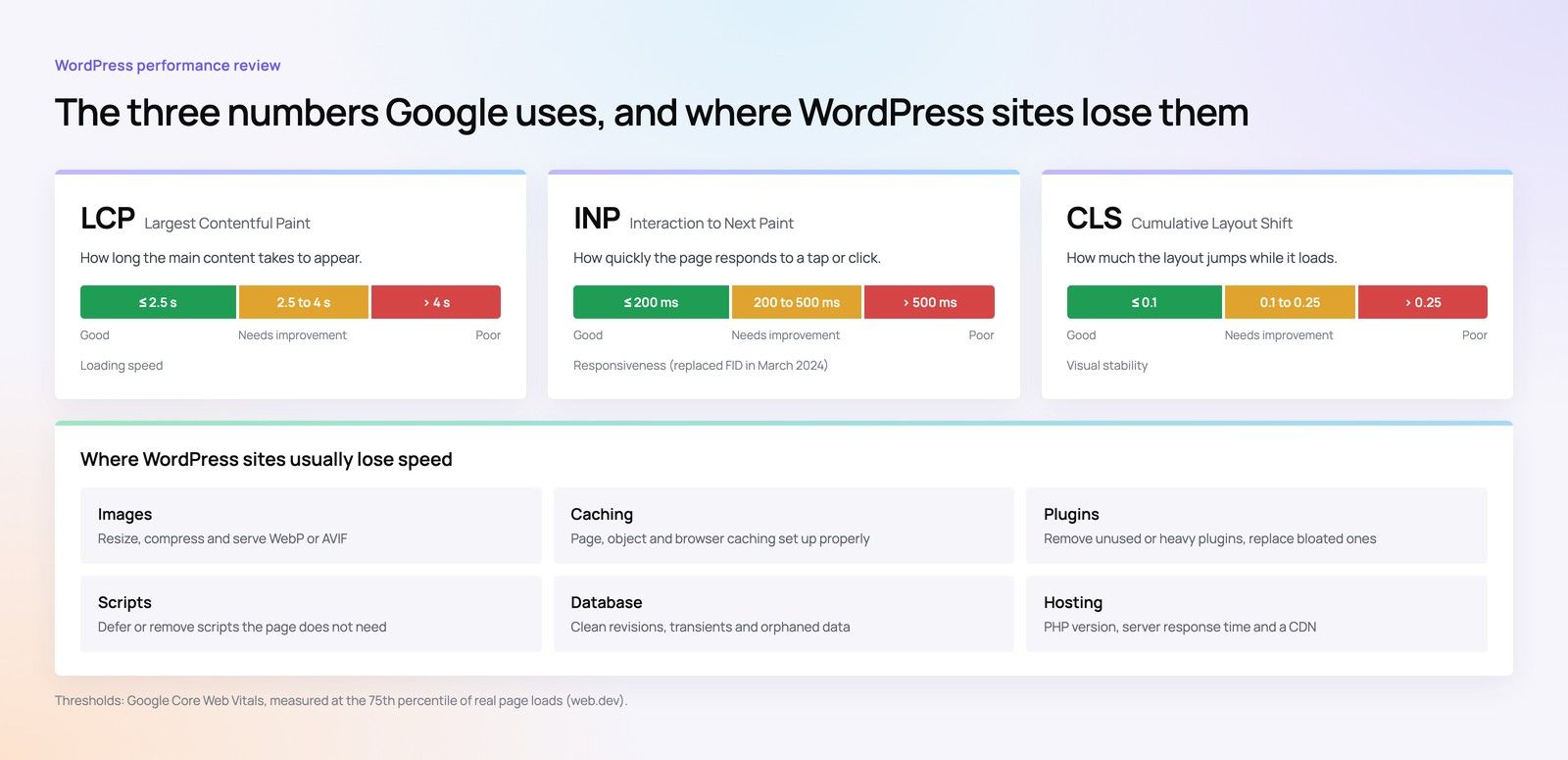
If you already run WordPress and it feels slow, a focused Core Web Vitals review usually finds the causes faster than a platform switch. Our Core Web Vitals checklist lists the common culprits.
Ownership, lock in and exit
Think about the day you might leave. With WordPress you own the code and the database. You can move host, change agency or rebuild the front end while keeping the content. With Webflow you own your design and content, and you can export static code and CMS content as CSV files, but dynamic features, forms and the editor stay on Webflow. A move away from Webflow is therefore closer to a rebuild than a migration.
Lock in is not automatically bad. Many organisations happily pay for a managed platform in exchange for less maintenance. The point is to choose it knowingly. If you are planning a move in either direction, our site migration team can map URLs and redirects so search visibility is protected.
Team skills and day to day running
Who will edit the site
Webflow suits teams with a designer who likes visual tools and a marketing team that wants to change pages without a developer. WordPress suits organisations that publish lots of content, need many integrations, or already have developers who know PHP and the WordPress ecosystem. Hiring for WordPress skills in the Kingdom is generally easier than hiring for Webflow, simply because WordPress is more widespread.
Who will maintain it
A WordPress site needs a maintenance plan: regular updates, backups, security monitoring and plugin reviews. Skip this and the site becomes a security risk. Webflow removes most of that work, though you still need someone to look after content quality, forms and integrations.
What drives cost on each platform
Prices change, so compare structure rather than headline numbers. These are the factors that move a quote up or down.
- Design depth: a custom design system in Arabic and English costs more than adapting a template, on either platform.
- Content volume: migration of existing pages, translation and Arabic copywriting are often underestimated.
- Integrations: CRM, ERP, payment gateways and booking systems add development and testing time.
- Licences: Webflow charges recurring site and workspace plans; WordPress may need paid plugins and themes with annual renewals.
- Hosting: included in Webflow plans; a separate line on WordPress, higher if you need hosting inside the Kingdom.
- Maintenance: heavier on WordPress, lighter on Webflow, but never zero.
For a broader view of how Saudi web projects are priced, read our article on web development cost in Saudi Arabia.
How to choose: a step by step checklist
- List what the site must do in year one and year three: pages, languages, products, forms, integrations.
- Decide whether Arabic is the primary language and design it first.
- Check data requirements with counsel: what personal data you collect and where it may be stored.
- If you sell online, confirm which payment providers can process mada and wallets for your business on each platform.
- Estimate content volume against Webflow plan limits.
- Name who will edit content and who will maintain the site each month.
- Prototype one complex page in Arabic and English and test it on phones.
- Compare total cost of ownership over three years, not just the build.
As a rough rule from these steps: content heavy, ecommerce led, integration heavy or data sensitive projects lean towards WordPress. Brand led marketing sites with modest content and a design minded team lean towards Webflow. If your needs go beyond both, a headless setup or a custom build may be the better fit.
How Codeeo helps Saudi businesses with WordPress vs Webflow decisions
Codeeo is a web, app, software, AI and marketing company with a team of 80+ across Dubai, Riyadh and Karachi. We have delivered 200+ projects across the UAE and the US and are rated 4.7 from 23 Google reviews. Clients in Riyadh can meet the team in person at our Riyadh office; for clients in Jeddah, Dammam and elsewhere in the Kingdom we work over video calls.
We start with your requirements rather than a preferred platform. That means reviewing your Arabic content plans, payment needs, data questions and team capacity, then recommending WordPress, Webflow or another route with the reasons written down. Our WordPress development and design teams build bilingual sites from the Arabic version outward, and if you already have a site, a website audit is a sensible first step. You can see examples of our work in our case studies.
To talk through your project, contact the Codeeo team.
Frequently asked questions
WordPress has mature right to left support in its core and an Arabic admin interface, which makes it a dependable choice for Arabic first sites.
Webflow can produce good Arabic pages too, but every component needs checking for correct mirroring. Whichever you choose, design the Arabic version first and test it on real phones before launch.
Web DevelopmentWordPress Website Cost in Saudi Arabia: What Shapes Design, Development and Maintenance CostsWhat shapes the cost of a WordPress website in Saudi Arabia: design, plugins, Arabic and RTL, WooCommerce, hosting, security and maintenance. Web DevelopmentAI Plugins for WordPress: What They Do Well and Where to Be CarefulWhat AI plugins for WordPress do well, where to be careful with privacy and speed, and when a custom AI integration is the better option.
 Web DevelopmentWhy Saudi Business Websites Lose Enquiries: 12 UX Mistakes to Fix FirstTwelve UX mistakes that cost Saudi business websites enquiries, from long forms and half Arabic pages to slow loads, plus what to fix first.
Tell us what the business needs. We will tell you what to build first.
Schedule a free consultation and get a written recommendation, with costs, before you commit to anything.
Get in touchPROVEN RESULTS
4.7 / 5verified reviews on Google