 Software DevelopmentDedicated Software Development Team: How It Works in 2026What a dedicated software development team is, who is on it, how it compares with in-house hiring, and how to choose a provider in 2026.
CodeeoInsightsSoftware Development
Inventory Management ERP: A Practical Guide for 2026
How an inventory management ERP connects stock, purchasing, warehouse and finance, how to keep records accurate, and how Dynamics 365, Business Central and Odoo compare.
Your Shopify orders say a product is available. The warehouse spreadsheet says there are two units left. A marketplace has already reserved one, the warehouse team hasn't posted yesterday's transfer, and accounting is waiting until month-end to reconcile inventory with the books. Everyone is looking at data, but nobody is looking at the same data.
That is the problem inventory management ERP software is meant to solve. It connects item records, purchasing, warehouse activity, sales orders, fulfillment, and financial valuation so that one transaction has one consistent operational history. The software helps, but it won't create accurate records by itself. The difficult work is deciding how products, locations, quantities, permissions, and exceptions should be managed.
What an Inventory Management ERP Actually Does
Consider a wholesale retailer that sells through Shopify, a sales team, and a marketplace. The buyer maintains purchase orders in one system, the warehouse tracks received goods in a spreadsheet, and the accountant calculates cost of goods sold separately. When a customer places an order, somebody checks several sources before promising a ship date.
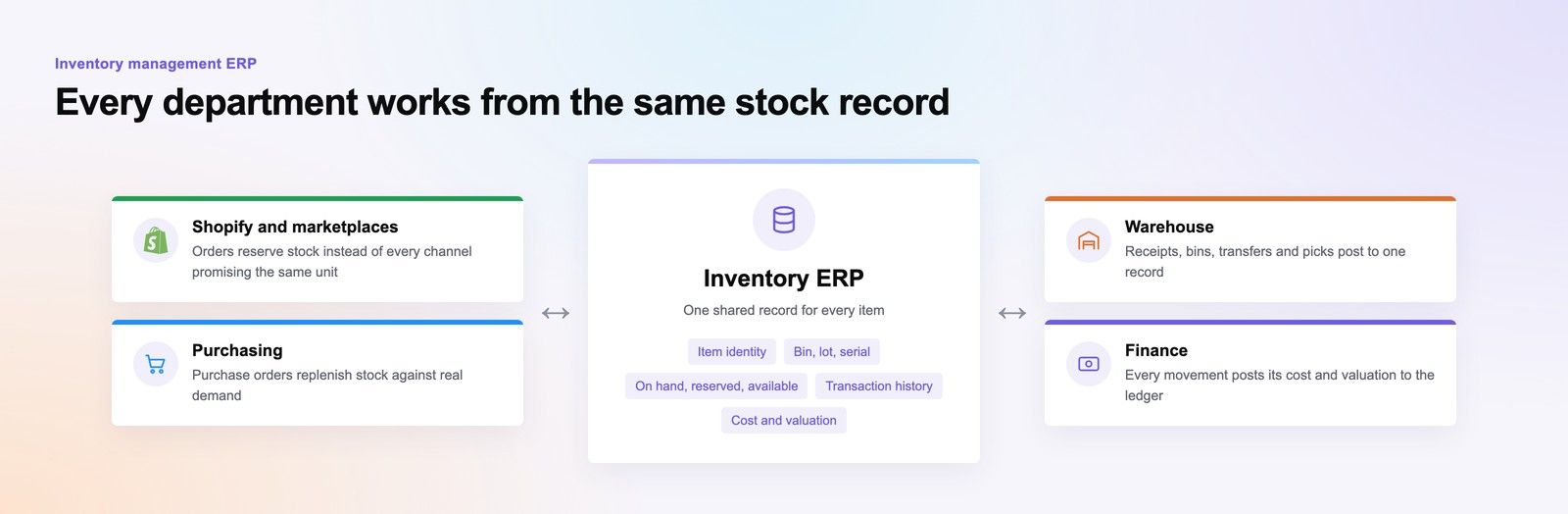
An inventory ERP replaces that chain of manual checks with a shared operational dataset. The item master defines what each product is, the warehouse records where it is, sales orders reserve it, purchasing replenishes it, and finance records its value. The point isn't to display a live stock number. The point is to connect the events that change stock with the departments that depend on those changes.
The shared dataset behind the screen
A useful ERP inventory record can include:
- Item identity: SKU, description, variant, barcode, supplier, and unit of measure.
- Physical position: warehouse, zone, bin, lot, or serial number.
- Commercial status: on hand, reserved, available, damaged, quarantined, or in transit.
- Transaction history: receipt, transfer, pick, shipment, return, adjustment, or count.
- Financial context: cost, inventory valuation, and the accounting entry created by movement.
When the warehouse receives a purchase order, the ERP can increase stock only after a controlled receipt. When a customer order is confirmed, it can reserve inventory rather than allowing every sales channel to promise the same unit. When goods ship, the system can reduce available stock and post the relevant cost to the ledger.
Practical rule: Treat inventory as a shared operational record, not as a number owned by the warehouse alone.
This category exists because isolated ledgers create contradictory answers. A spreadsheet might show physical stock, Shopify might show sellable stock, and accounting might show financial stock. An ERP gives those records common definitions and transaction controls. It doesn't remove the need for warehouse discipline, but it gives every team the same place to apply that discipline.
How Inventory ERP Evolved From MRP to Today
Inventory ERP grew from manufacturing problems rather than from retail dashboards. Early computerized material-planning packages appeared in the 1960s, helping manufacturers identify material requirements and monitor item usage. The early systems automated calculations that were difficult to manage reliably with paper records.
A notable milestone came when J.I. Case, a US manufacturer of construction machinery and tractors, worked with IBM in the late 1960s on one of the earliest material requirements planning applications, as described in this history of ERP and material planning. The system used a master production schedule, bills of materials, inventory balances, and purchasing information to calculate which components were needed, in what quantities, and by when.
Each generation added another connection
During the 1970s, MRP expanded from basic inventory control into coordinated product and parts planning. In the 1980s, manufacturing resource planning, or MRP II, connected materials with production capacity and broader manufacturing activity. Gartner coined the term enterprise resource planning in 1990 for the next generation of integrated MRP II systems, according to the same historical source.
By the mid-1990s, ERP platforms commonly connected manufacturing and distribution with finance, human resources, and other enterprise functions. That progression explains why modern inventory ERP includes more than stock quantities.
The historical lesson is practical. Each stage became more valuable by connecting inventory decisions to another business process. A current implementation for Business Central, Dynamics 365, or Odoo should follow the same principle. If the platform only digitizes a spreadsheet while purchasing, sales, warehouse, and finance continue using separate definitions, the business has recreated the old problem in a newer interface.
Core ERP Inventory Modules and How a Real Transaction Flows
A reliable inventory ERP starts with structure. Before a buyer compares dashboards, the business needs clear answers about what it sells, where it stores products, how it counts them, and which transactions change ownership or value.
The essential building blocks include:
- Item master: The canonical record for each product, including variants, barcodes, suppliers, and replenishment settings.
- Units of measure: Rules for buying, storing, selling, and converting items, such as cases into individual units.
- Warehouses and bins: The physical model that tells the ERP where inventory can be received, stored, picked, quarantined, or shipped.
- Lots and serials: Traceability for batches, expiration-sensitive goods, regulated products, or individually identified equipment.
- Costing: The method used to value stock and assign cost to shipments, production, returns, and adjustments.
- Inventory documents: Purchase receipts, transfers, picks, shipments, returns, and approved adjustments.
The difficult part is often SKU modeling. A black medium shirt, a black large shirt, and a boxed six-pack of that shirt may be related products, but they aren't interchangeable inventory records. If the ERP doesn't distinguish variants and units correctly, available-to-promise calculations can look precise while allocating the wrong stock.
One purchase order from receipt to ledger
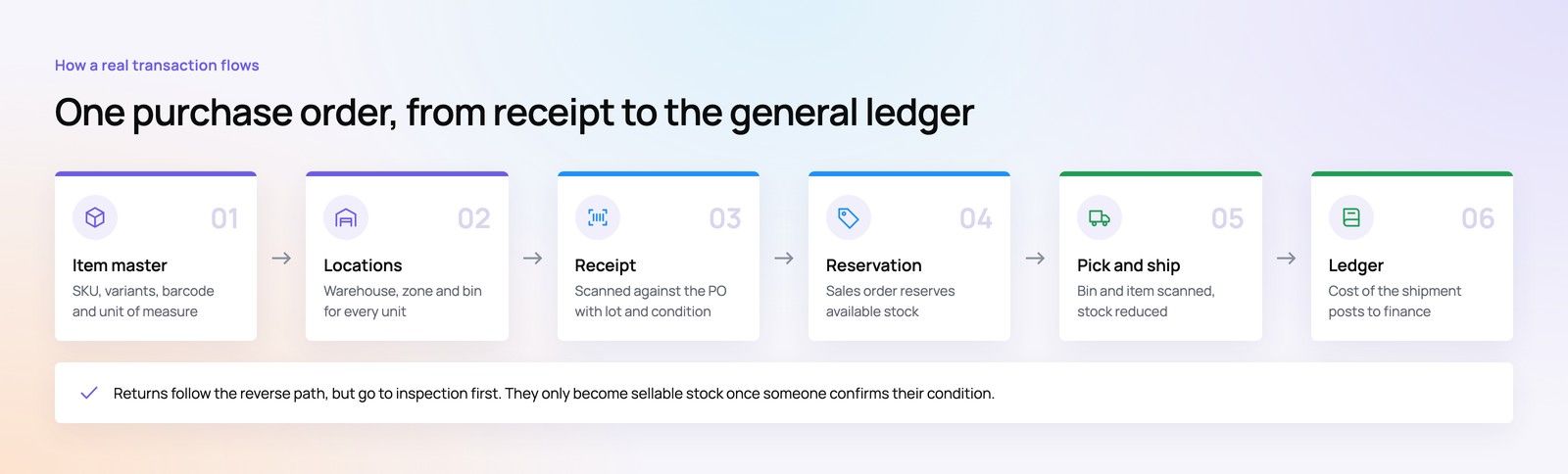
Take a wholesale buyer ordering cases of coffee from a supplier. The purchasing team creates a purchase order for a defined item, unit, price, expected date, and destination warehouse.
When the shipment arrives, a receiver scans the products and records the actual quantity, lot, and condition. The ERP compares the receipt with the purchase order, posts accepted goods into the appropriate location, and routes any variance for review. The warehouse then puts some cases into reserve storage and some into a picking bin, creating a traceable movement between locations.
A customer order enters from the sales system. The ERP checks available stock, existing reservations, warehouse rules, and any lot or serial restrictions. If the quantity is available, the order can be confirmed and a pick instruction can be created. The picker scans the bin and item, the packer confirms the shipment, and the ERP reduces the relevant stock balance.
At shipment, the system records the inventory issue and posts the associated cost to the general ledger. A return follows the reverse path, but it shouldn't automatically become sellable stock. The receiving team must determine whether it is resalable, damaged, or subject to inspection.
Inventory Accuracy as the Real Constraint
An ERP doesn't make inventory accurate on its go-live date. It makes the business's existing definitions and habits more visible.
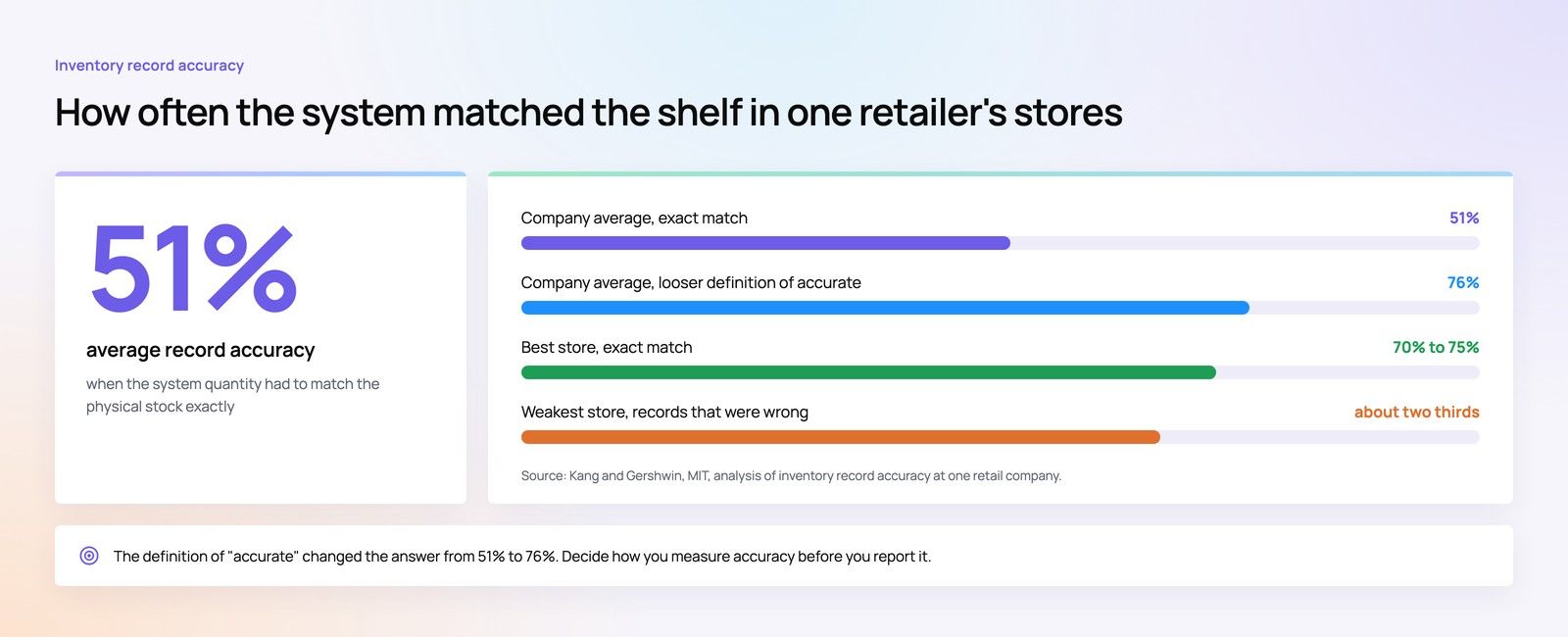
An MIT study found that one retail company's average inventory-record accuracy was 51% when accuracy required the system quantity to match physical stock exactly, as reported in the MIT analysis of inventory record accuracy. The best-performing store had exact matches for only 70% to 75% of SKU records, while one store had inaccurate records for approximately two-thirds of its SKUs. Under a less strict definition, the company's average was 76%, showing why the measurement rule matters.
Define accuracy before measuring it
For an ERP, inventory-record inaccuracy means the quantity in the system differs from the quantity physically available. That difference affects more than a warehouse report:
- Replenishment: Incorrect on-hand balances distort reorder points and safety stock.
- Available to promise: The system may confirm an order for stock that can't be picked.
- Picking: A bin may appear full in the application while the picker finds it empty.
- Valuation: Financial inventory can diverge from the goods the business controls.
The MIT research also connected inaccurate records with stock-loss and replenishment problems. In a simulation under the study's stated conditions, with stock loss absent, a reorder point of 41 produced a stockout rate of 0.5%, illustrating that planning logic can work only when its inputs reflect reality.
Configure controls at the point of movement
A practical design uses standardized item and unit-of-measure records, barcode or scanner discipline, controlled receiving, documented returns, and approved transfer workflows. It also requires cycle counts and reconciliation between system quantities and physical stock.
For practical guidance on reducing stockouts and simplifying inventory workflows, ServeApps inventory management advice provides a useful complementary resource. The central decision remains internal: define what “accurate” means, assign ownership, record adjustment reasons, and make repeated discrepancies visible.
A polished dashboard can report a bad receipt faster than a spreadsheet. It can't make the receipt correct.
Designing Cycle Counts That the ERP Can Actually Run
Cycle counting works best when the ERP decides what deserves attention, rather than assigning identical counting work to every warehouse and SKU. Research on two-echelon supply chains supports a risk- and location-based approach, while research on count allocation in serial and two-stage supply chains indicates that downstream locations generally warrant more frequent counting because errors there are closer to customer fulfillment decisions.
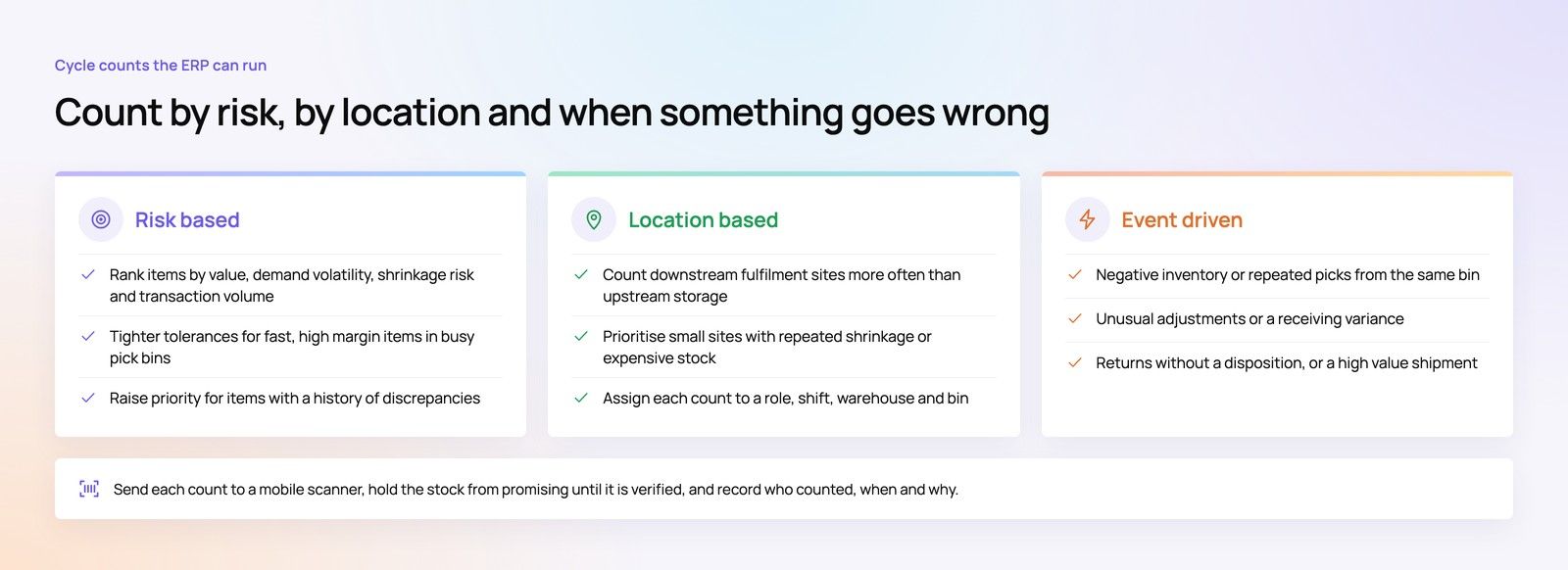
Start by classifying stock according to value, demand volatility, shrinkage or spoilage risk, and transaction volume. A high-margin item picked constantly from a busy forward bin deserves tighter tolerances than a slow-moving, low-risk item in secure reserve storage. The count policy should reflect service impact, not just the number of units stored.
Build a priority score
An ERP can rank count candidates using a practical score based on estimated service impact, demand rate, and unit margin, adjusted for discrepancy history and lead-time exposure. The exact formula matters less than making the decision explicit and reviewable.
Use the result to determine:
- Frequency: Count high-impact items and locations more often.
- Tolerance: Require investigation when variance exceeds the approved threshold.
- Ownership: Assign the count to a role, shift, warehouse, and location.
- Evidence: Record the user, timestamp, reason, bin, lot or serial, and approval.
Location matters as much as product class. A downstream fulfillment site may need tighter control than an upstream storage facility because its errors immediately affect order promises. A smaller site with repeated shrinkage or expensive stock may also deserve priority over a larger, more stable warehouse.
Add event-driven counts
Calendar schedules catch routine drift, but operational events often reveal immediate risk. Configure the ERP to trigger a count after:
- Negative inventory: A quantity falls below zero.
- Repeated picks: Multiple pick attempts target the same bin.
- Unusual adjustments: A user posts an adjustment outside normal behavior.
- Receiving variance: Delivered stock differs from the purchase receipt.
- Returns: Returned goods re-enter inventory without a clear disposition.
- High-value shipment: A material shipment creates a reason to verify the remaining balance.
The system should route the exception to a mobile scanner, suspend the affected stock from promising when appropriate, and release it only after verification. That creates a closed loop. The count isn't just a compliance task, it becomes evidence about receiving quality, bin design, picking behavior, and shrinkage.
Teams evaluating an Odoo rollout can also review Odoo implementation and integration services to understand how warehouse workflows and custom controls may fit into the platform.
Comparing Dynamics 365, Business Central, and Odoo for Inventory
These platforms can all support inventory operations, but they suit different operating models. A convincing demo doesn't prove that a system fits your warehouse, licensing model, integrations, or governance requirements.
| Dimension | Dynamics 365 Supply Chain | Business Central | Odoo |
|---|---|---|---|
| Best fit | Larger, multi-site operations with complex warehouse, manufacturing, and supply-chain requirements | Finance-led mid-market businesses seeking connected operations and commerce | Modular businesses wanting inventory alongside other business applications |
| Warehouse depth | Strong support for advanced warehouse and supply-chain processes, depending on configuration and licensing | Capable warehouse and distribution workflows, with depth shaped by extensions and setup | Flexible inventory and warehouse modules, with capabilities shaped by selected apps and customization |
| Variants, lots, and serials | Suitable for complex item, traceability, and operational models | Supports item variants and traceability workflows for many mid-market scenarios | Supports variants and traceability, with careful configuration needed for business-specific rules |
| Commerce and external systems | Often used in broader integration landscapes involving commerce, 3PL, manufacturing, and reporting | Natural fit for Microsoft-centric finance, sales, commerce, and reporting environments | Connects through modules, APIs, and custom integrations across commerce and business applications |
| Main evaluation question | Does the organization need enterprise supply-chain depth and governance? | Can the finance and operations team adopt the required processes without excessive extension work? | Which modules and customizations are necessary to make the standard workflow fit? |
Dynamics 365 Supply Chain
Dynamics 365 Supply Chain Management is a strong candidate for organizations managing multiple sites, advanced warehouse execution, manufacturing dependencies, or detailed supply planning. Buyers should test real scenarios such as partial receipts, inter-site transfers, reservations, quality holds, and 3PL handoffs, rather than accepting a generic stock-list demonstration.
For businesses already committed to Microsoft technologies, the wider Microsoft Dynamics 365 implementation context may matter as much as the inventory module itself. Integration with finance, analytics, customer operations, and identity controls can reduce duplication, but it also increases the need for clear ownership and governance.
Business Central
Business Central often suits mid-market companies where finance, purchasing, sales, and inventory need to operate in one Microsoft-centered environment. It can be a sensible choice for a distributor or retailer that wants stronger stock control without adopting the full complexity of a large supply-chain program.
The key question is whether the standard warehouse and replenishment processes match the operation. If the answer depends on numerous extensions, custom fields, or manual workarounds, the buyer should test the total operating model rather than only the license feature list.
Odoo
Odoo takes a modular approach. Inventory can sit alongside sales, purchasing, manufacturing, accounting, ecommerce, or other applications, which can make the platform attractive when the business wants a broad system assembled around its priorities.
That flexibility creates a responsibility. The buyer must define which application owns each process, how variants and units are modeled, and which workflows require customization. Odoo may be a good fit for a faster or more custom implementation, but “modular” doesn't mean “automatic.” Configuration quality and integration design still determine whether the stock picture can be trusted.
Integration, Reporting, and the Security Trade-offs Nobody Mentions
Connecting Shopify, marketplaces, warehouses, 3PLs, finance, and business intelligence sounds like a technical checklist. It isn't. Every connection creates questions about ownership, timing, failure handling, and access.
A 2025 to 2026 SAPinsider survey found that 82% of respondents considered integration between core ERP and line-of-business applications a top requirement, while 75% prioritized cleansed and harmonized operational data, according to the SAPinsider integration and data findings. The figures point to a practical reality: integration is valuable only when the connected systems use compatible meanings.
Decide who owns each inventory truth
Before building an API, document the answers to these questions:
- Available to promise: Does the ERP, warehouse system, or commerce platform own the sellable balance?
- Reservations: Where is an order reservation created, and how is it released after cancellation?
- Backorders: Which system holds the backorder and communicates its status?
- Transfers: When does stock leave the source location, and when does the destination receive it?
- Failures: What happens when Shopify sends an order but the ERP doesn't receive it?
- Reconciliation: Which report compares orders, reservations, shipments, returns, and stock adjustments?
A feed can be technically successful while still being operationally wrong. For example, Shopify might receive an available quantity before the warehouse has completed a transfer, or a 3PL might confirm shipment without sending the lot information needed for traceability. These are semantic and process failures, not merely connectivity failures.
For a broader perspective on the design issues behind connected business applications, Loopfour's integration insights is a useful resource. Your project should also include a written failure-mode runbook, with owners, retry rules, reconciliation steps, and customer-service instructions.
Protect the expanded attack surface
More integrations create more paths into operational data. The cited research recommends zero-trust controls and encryption for ERP-connected data flows, alongside stronger attention to interoperability and security.
Apply least-privilege permissions to warehouse, purchasing, finance, integration, and administrator roles. Log changes to item records, stock adjustments, reservations, and interface configurations. Keep sensitive flows encrypted, and make sure a failed synchronization can't overwrite an approved quantity.
The first dashboard should stay focused. Show on-hand accuracy, stockout rate, aged inventory, order fill rate, and gross margin by SKU only if each metric has a defined source, owner, calculation, and review action. A dashboard is useful when a manager knows what decision follows a red indicator.
For Microsoft-led operations, Business Central implementation guidance can help frame the connection between finance, inventory, and operational workflows. The same principle applies across platforms: integration design must serve a controlled process, not produce more synchronized fields.
A Short Checklist for Your First 90 Days With an Inventory ERP
Use the first ninety days to settle definitions and controls before adding advanced forecasting or automation. The ERP should become the shared operational dataset, but the team must decide what each record means and who is accountable for keeping it accurate.
Before configuration
- Standardize the item master: Define SKU, variant, barcode, description, supplier, and unit-of-measure rules.
- Map physical locations: Document warehouses, zones, bins, quarantine areas, and in-transit states.
- Set transaction ownership: Identify who approves receipts, transfers, returns, adjustments, and stock releases.
- Choose the accuracy measure: Decide whether the dashboard tracks exact agreement, tolerance-based agreement, monetary variance, location accuracy, or sellable availability.
- Design cycle counts: Prioritize items and locations using value, demand, risk, transaction volume, and discrepancy history.
- Assign available-to-promise ownership: Make one system authoritative for reservations, promises, and backorders.
- Write the failure runbook: Cover missed orders, duplicate messages, delayed shipments, failed transfers, and reconciliation.
At go-live
Put on-hand accuracy, stockout rate, and order fill rate on the first dashboard. Add aged inventory and margin analysis after the underlying item, cost, and transaction data has proved reliable.
The most common misconception is that switching systems automatically fixes inventory. An ERP amplifies the process around it. If staff receive goods late, use inconsistent units, skip scans, or approve unexplained adjustments, the new platform will produce faster reports about the same underlying errors.
Start with a small set of controlled flows, test them with warehouse staff, and require every exception to have an owner. Reliable inventory management ERP software is less about collecting more data than about making each stock movement understandable, authorized, and reconcilable.
Codeeo helps US businesses implement Microsoft Dynamics 365, Business Central, and Odoo, connect ecommerce and warehouse systems, and replace spreadsheet-based inventory processes with integrated software. Talk to Codeeo to discuss your inventory workflow, integration risks, and the right implementation path.
Software DevelopmentDedicated Software Development Team: How It Works in 2026What a dedicated software development team is, who is on it, how it compares with in-house hiring, and how to choose a provider in 2026. Software DevelopmentSoftware Co-Development: How It Works and When to Use ItWhat software co-development is, how it differs from outsourcing and staff augmentation, how to run it day to day, and when it is the right model in 2026.
 Software DevelopmentReal Estate Software in the UAE: Types, Tools and How to ChooseHow to choose real estate software in the UAE, with active products compared and the Ejari, Trakheesi and DLD requirements your system must handle.
Tell us what the business needs. We will tell you what to build first.
Schedule a free consultation and get a written recommendation, with costs, before you commit to anything.
Get in touchPROVEN RESULTS
4.7 / 5verified reviews on Google