 Web DevelopmentWordPress Website Cost in Saudi Arabia: What Shapes Design, Development and Maintenance CostsWhat shapes the cost of a WordPress website in Saudi Arabia: design, plugins, Arabic and RTL, WooCommerce, hosting, security and maintenance.
Why Saudi Businesses Are Moving to Headless CMS
Headless CMS explained for Saudi businesses: speed, Core Web Vitals, bilingual content, Next.js front ends and when WordPress still fits.
Saudi businesses are moving to a headless CMS because it separates content from presentation, which lets one editorial team publish Arabic and English content to a fast website, a mobile app and other channels from a single source. The front end, often a Next.js website, can be tuned for speed and Core Web Vitals without fighting a theme, while editors keep a familiar interface for their daily work.
That said, a decoupled architecture is not the right answer for every organisation. This headless CMS Saudi Arabia guide explains what changes when you go headless, where it pays off for companies in Riyadh, Jeddah and Dammam, where a traditional WordPress build is still the sensible choice, and what to plan for if you migrate.
What a headless CMS actually is
A traditional content management system does two jobs at once. It stores your content, and it renders that content into web pages through a theme. WordPress, in its classic form, is the best known example: the same installation holds your posts, decides how they look and serves the HTML to visitors.
A headless system keeps the first job and drops the second. Content lives in a structured back end and is exposed through an API. A separate front end, built in a framework such as Next.js, Nuxt or Astro, requests that content and decides how to display it. The same API can also feed a mobile app, a kiosk in a showroom, a WhatsApp bot or a partner portal.
The parts of a typical headless stack
- The content repository. Strapi, Contentful, Sanity, Directus, Payload or WordPress running in headless mode. This is where editors work.
- The front end. Usually Next.js or a similar framework, deployed to a hosting platform with a global edge network.
- The delivery layer. A CDN and caching rules that serve pages quickly to visitors across the Kingdom and the wider Gulf.
- Integrations. Search, forms, CRM, analytics, payments and translation tools, connected through APIs rather than plugins.
Headless versus decoupled versus traditional
You will hear these terms used loosely. A traditional CMS couples content and presentation. A decoupled CMS still ships with a default front end but also offers an API. A fully headless product has no front end at all. In practice, most Saudi projects we see sit somewhere in the middle, and the label matters less than how content flows from editor to visitor.
Why the shift is happening in Saudi Arabia
The move toward headless architecture in the Kingdom is driven less by fashion and more by a handful of local pressures that a single theme struggles to meet.
Arabic first, bilingual by default
Most serious Saudi websites need Arabic as the primary language with full right to left layout, plus an English version for expatriate staff, investors and international partners. In a traditional theme, RTL support is often an afterthought layered on with extra stylesheets and translation plugins. A headless content model lets you define fields per locale, enforce that every Arabic page has its English counterpart, and build the front end with logical CSS properties so direction flips cleanly. If bilingual governance is a pain point for your team, our guide to Arabic and English website governance covers the editorial side in more depth.
Speed on mobile networks
Saudi audiences browse overwhelmingly on phones. Every extra script, font file and plugin adds weight. A Next.js website can be statically generated or rendered on the server, then cached at the edge, so the first meaningful paint arrives quickly even on a congested connection. You choose exactly which JavaScript ships to the browser instead of inheriting whatever a theme and its plugins load.
More channels than a website
Retailers, banks, developers and government linked entities increasingly publish the same content to a website, an app and in store screens. Writing a promotion three times in three systems invites inconsistency. With a headless model, the promotion is one content entry, and each channel decides how to render it.
Vision 2030 and digital expectations
Vision 2030 has pushed many organisations to modernise customer facing services, and buyers now expect websites that feel as polished as the best consumer apps. Headless architecture is one practical route to that standard, though it is a means, not a goal in itself.
Core Web Vitals and performance gains
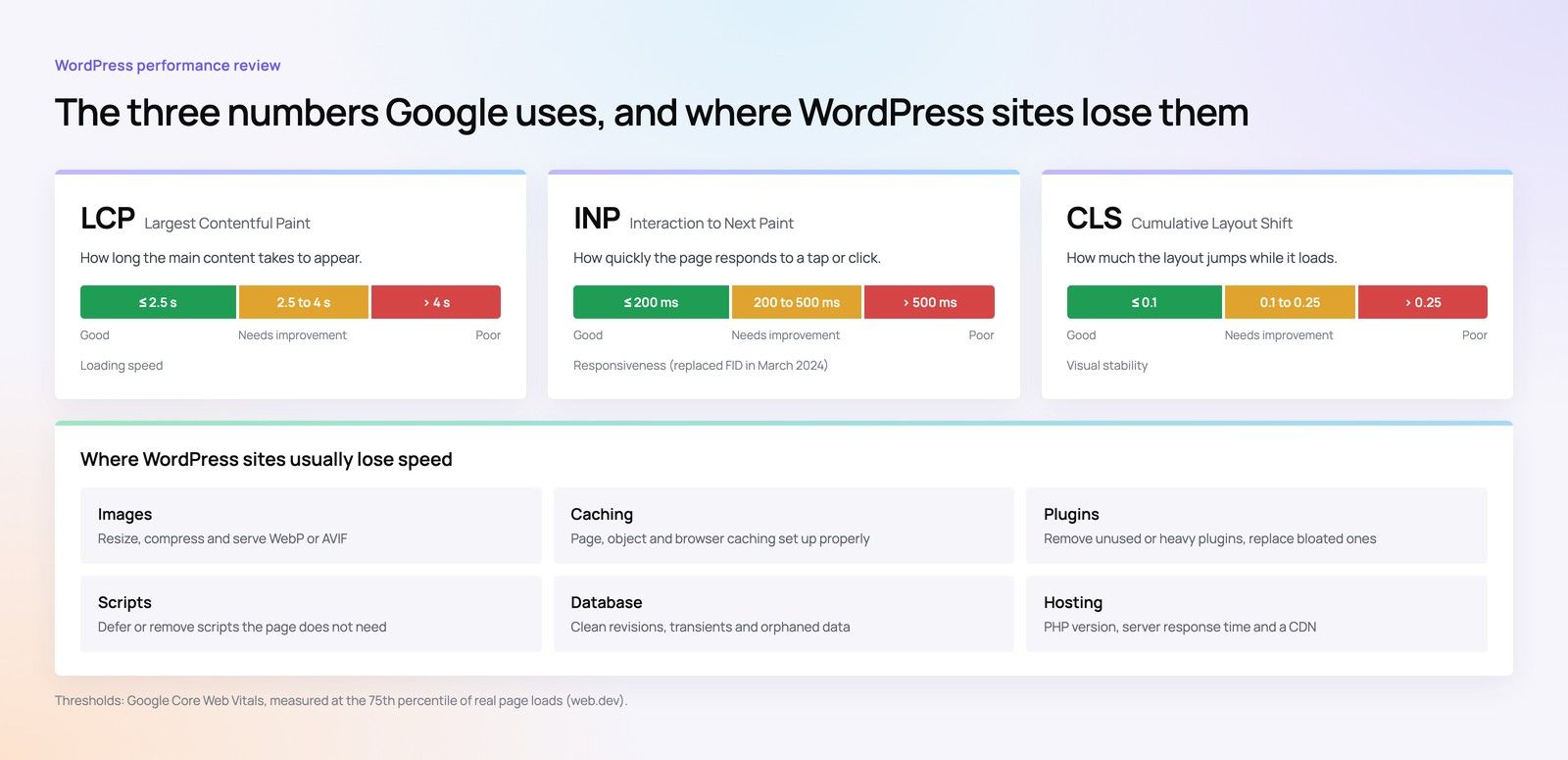
Google uses Core Web Vitals as part of its page experience signals, and they are a reasonable proxy for how fast a site feels to a real visitor. The three metrics are Largest Contentful Paint for loading, Interaction to Next Paint for responsiveness, and Cumulative Layout Shift for visual stability. Google documents them in its Search Central documentation.
Where traditional sites usually lose points
- Heavy page builders that output deeply nested markup and large CSS bundles.
- Plugins that each load their own scripts on every page, even where they are not used.
- Web fonts, especially Arabic fonts with large character sets, loaded without subsetting or preloading.
- Images uploaded at full size and resized by the browser.
- Banners and cookie notices that push content down after the page has started to render.
How a headless front end helps
A well built modern front end addresses each of these. Pages can be pre rendered, images are served in modern formats at the right dimensions, fonts are self hosted and subset, and scripts are split so each page loads only what it needs. None of this is automatic, though. A poorly built headless front end can be just as slow as a bloated theme. The benefit is control, and control only helps when someone uses it well. Our Core Web Vitals checklist sets out what to measure before and after any rebuild.
Choosing a content platform: Strapi CMS and the alternatives
There is no single best headless platform. The right choice depends on who will edit content, where data must be stored, and how much you want to own versus rent.
| Option | Hosting model | Strengths | Watch points |
|---|---|---|---|
| Strapi CMS | Self hosted or vendor cloud | Open source, flexible content types, built in internationalisation, you control where data lives | You own upgrades, security patches and backups when self hosting |
| Headless WordPress | Self hosted | Editors already know the interface, large ecosystem, mature roles and workflows | Many plugins assume a theme and do not work headless; needs careful API design |
| Contentful or Sanity | Vendor cloud | Polished editor experience, strong APIs, little infrastructure to manage | Data residency and vendor terms need review; plan limits can shape the content model |
| Payload or Directus | Self hosted or vendor cloud | Developer friendly, sits close to your own database | Smaller community, so fewer ready made integrations |
Data location and PDPL
The Personal Data Protection Law, overseen by SDAIA, sets rules for how personal data is processed and transferred. Most marketing content is not personal data, but contact forms, user accounts and newsletter lists are. If your content platform also stores any of that, where it is hosted matters. A self hosted Strapi instance in a Saudi or approved region gives you more direct control than a SaaS product whose servers sit elsewhere. Treat this as a design input and confirm the specifics with your legal counsel or the regulator before you commit.
Editor experience
Developers often choose the platform; editors live with it. Before you decide, ask the people who will publish every day to try creating an Arabic landing page, adding an English translation and scheduling it. If they struggle, adoption will suffer, no matter how elegant the architecture.
When traditional WordPress is still the right choice
Headless is not a promotion from WordPress. For many Saudi businesses, a well built traditional site remains faster to launch and cheaper to run.
Signs you should stay traditional
- Your site is mainly a brochure with a blog, and the website is the only channel.
- A small marketing team needs to build pages visually without developer help.
- You rely on WordPress plugins for features such as event booking or membership that would need rebuilding in a headless front end.
- There is no in house or retained development capacity to maintain two separate systems.
A lean theme, careful plugin selection and good hosting can bring a traditional site to strong Core Web Vitals scores. If that describes your situation, our WordPress development team can usually get you further, faster, than a full rebuild.
The middle path: headless WordPress
Headless WordPress keeps the editor interface your team already knows and replaces only the front end. It suits organisations with years of content and established workflows that want the performance of a modern front end without retraining every editor. The trade off is that some plugins stop working, and previews need extra development so editors can see a page before it goes live.
Migration considerations
Moving to a headless architecture is a migration project, not a redesign with a new logo. The risks are mostly about content, URLs and search visibility. If you are planning a larger move, our guide to enterprise website migration in Saudi Arabia covers governance and sign off in more detail.
A step by step migration plan
- Audit existing content. List every page, post, file and form in both languages. Mark what to keep, merge or retire.
- Design the content model. Turn page templates into structured types with fields, such as a service type with a title, summary, body, FAQs and related case studies.
- Map every URL. Record old and new addresses, then plan permanent redirects for anything that changes, in Arabic and English.
- Migrate with scripts, not copy and paste. Automated imports keep formatting consistent and make reruns possible when the model changes.
- Rebuild SEO essentials. Titles, meta descriptions, hreflang between Arabic and English, canonical tags, structured data and XML sitemaps all need to be generated by the new front end.
- Set up previews and roles. Editors need to see drafts before publishing and should only have the permissions they need.
- Test performance and accessibility. Measure Core Web Vitals on real devices and check that RTL layouts read correctly with a screen reader.
- Launch with monitoring. Watch Search Console, server logs and form submissions closely in the first weeks after go live.
Common migration mistakes
- Forgetting the Arabic URLs when building the redirect map.
- Losing form integrations, so leads silently stop reaching the CRM.
- Shipping without a preview mode, so editors publish blind.
- Rebuilding every page as a custom component, which leaves editors unable to make simple changes.
Our site migration service exists for exactly this phase, and a technical SEO review before launch is a sensible safeguard.
Security and operations in a headless setup
Separating the front end from the content store reduces the attack surface of the public site, because visitors never touch the admin panel directly. It does not remove security work. The API needs authentication, rate limiting and careful permissions. The content platform needs patching. Secrets such as API tokens must stay out of the browser.
Organisations in regulated sectors should also map their setup against the NCA cybersecurity controls that apply to them. These cover areas such as access management, logging and incident response in general terms, and the right controls depend on your sector and classification, so confirm the details with your compliance team.
Questions to settle before launch
- Who patches the CMS, and how quickly after a security release?
- Where are backups stored, and has a restore been tested?
- Which logs are kept, for how long, and who reviews them?
- How are editor accounts created and removed when staff change roles?
Is headless right for your business? A quick checklist
Answer yes or no to each point. The more yes answers, the stronger the case for a headless approach.
- We publish the same content to more than one channel, such as a website and an app.
- Our current site fails Core Web Vitals and theme changes have not fixed it.
- Bilingual content management is causing errors or delays.
- We need integrations that our current plugins handle poorly.
- We have, or can retain, developers to maintain a front end codebase.
- Our editors are willing to work with structured fields rather than a visual page builder.
- We expect the site to grow significantly in pages, languages or features.
If most answers are no, a faster traditional build is likely to serve you better. If most are yes, it is worth scoping a headless architecture properly before committing.
How Codeeo helps Saudi businesses with headless CMS projects
Codeeo designs and builds websites, apps and software, with 200+ projects delivered across the UAE and the US and a team of 80+ across Dubai, Riyadh and Karachi. Clients rate us 4.7 from 23 Google reviews. Because we have an office in Riyadh, clients in the capital can meet the team in person, and we work with businesses elsewhere in the Kingdom over video calls.
On a headless project, we start by deciding whether headless is right at all. Where it is, we design the content model with your editors, build the front end, typically as a Next.js website, and handle migration, redirects and bilingual SEO. Where it is not, we say so and recommend a well built traditional site instead. Related services include web development, headless commerce for stores that need the same flexibility, and Core Web Vitals optimisation for sites that only need a performance fix.
If you are weighing up a move, talk to our Riyadh team about your current site and what you need it to do next.
Frequently asked questions
It is a content system that stores and manages content but does not decide how that content looks.
Content is delivered through an API to a separate front end, such as a website or mobile app, which handles the design. This lets one team manage Arabic and English content once and publish it to several channels, each with its own layout and performance tuning.
Web DevelopmentWordPress Website Cost in Saudi Arabia: What Shapes Design, Development and Maintenance CostsWhat shapes the cost of a WordPress website in Saudi Arabia: design, plugins, Arabic and RTL, WooCommerce, hosting, security and maintenance. Web DevelopmentWordPress vs Webflow for Saudi Businesses: An Honest ComparisonWordPress or Webflow? An honest comparison for Saudi businesses: Arabic and RTL, CMS needs, ecommerce, SEO, ownership and team skills.
 Web DevelopmentAI Plugins for WordPress: What They Do Well and Where to Be CarefulWhat AI plugins for WordPress do well, where to be careful with privacy and speed, and when a custom AI integration is the better option.
Tell us what the business needs. We will tell you what to build first.
Schedule a free consultation and get a written recommendation, with costs, before you commit to anything.
Get in touchPROVEN RESULTS
4.7 / 5verified reviews on Google