 E-CommerceShopify Instagram Integration in 2026: Setup, Tagging and CostsHow to connect Shopify to Instagram in 2026: the requirements, setup steps, product tagging, checkout, costs and fixes for common connection errors.
Shopify Tabby Integration UAE
A done-for-you Shopify Tabby integration service for UAE merchants: setup support, configuration, checkout testing and handover.
A done-for-you Shopify Tabby integration service helps UAE merchants add the Tabby payment method to their Shopify checkout with less technical guesswork. The offer is built for stores that already sell in the UAE, are preparing to launch, or want to improve their UAE Shopify payments stack with a flexible buy now, pay later option. You get setup support, configuration guidance, checkout testing, and practical advice on how Tabby fits alongside your other Shopify payment solutions.
What does this integration include?
This service covers the practical work needed to prepare, connect, configure, and test Tabby on a Shopify store in the UAE. Tabby states that Shopify is one of its supported ecommerce platforms, and its merchant guidance explains that businesses typically use API keys from the Tabby Merchant Dashboard, install the relevant plugin or integration, configure payment settings, test checkout, and then go live. (tabby.ai)
Instead of leaving your team to interpret every setup step alone, the integration is handled as a structured implementation. The goal is not just to "switch on" another payment button, but to make sure Tabby appears in the right checkout context, works with your store settings, and is tested before customers rely on it.
Included in the Shopify Tabby integration UAE service:
- Review of your current Shopify checkout, currency, market, and payment settings
- Guidance on Tabby merchant account readiness and required access
- Tabby payment method configuration inside your Shopify environment
- Support with API key placement or platform-specific setup steps where applicable
- Checkout testing from product page to payment selection and order confirmation
- Basic troubleshooting for common setup conflicts, missing credentials, or visibility issues
- Advice on how Tabby should sit alongside card payments, Shopify Payments, COD, bank transfer, or other UAE Shopify payments
- Post-setup handover so your team understands what was configured and what to monitor
Built for UAE Shopify merchants
The service is designed for UAE-based ecommerce brands that want to give shoppers more choice without rebuilding their store. Tabby Business is available to online and in-store merchants based in the UAE and Saudi Arabia, subject to eligibility such as legal registration, an active sales channel, business documentation, and a business bank account. (tabby.ai)
That makes the integration especially relevant for fashion, beauty, electronics, home, wellness, gifting, accessories, and other product-led Shopify stores where customers may compare payment flexibility before completing a purchase. Tabby's UAE consumer payment page describes Pay in 4 as a way for shoppers to split purchases into four monthly payments online or in-store, with no interest or hidden fees when payments are made on time. (tabby.ai)
This service is also useful if you are upgrading your checkout from a basic setup to a more complete payment mix. Shopify's UAE payment gateway information notes that UAE merchants can use Shopify Payments and other supported payment providers, so Tabby can be considered as part of a broader Shopify payment solutions strategy rather than a standalone decision. (help.shopify.com)
A clearer checkout path for flexible payments
A payment option only helps if customers can find it, understand it, and complete the order smoothly. During implementation, the checkout flow is reviewed from the shopper's point of view: product selection, cart, checkout, payment method visibility, confirmation, and order record. That review helps catch small issues that can create unnecessary friction.
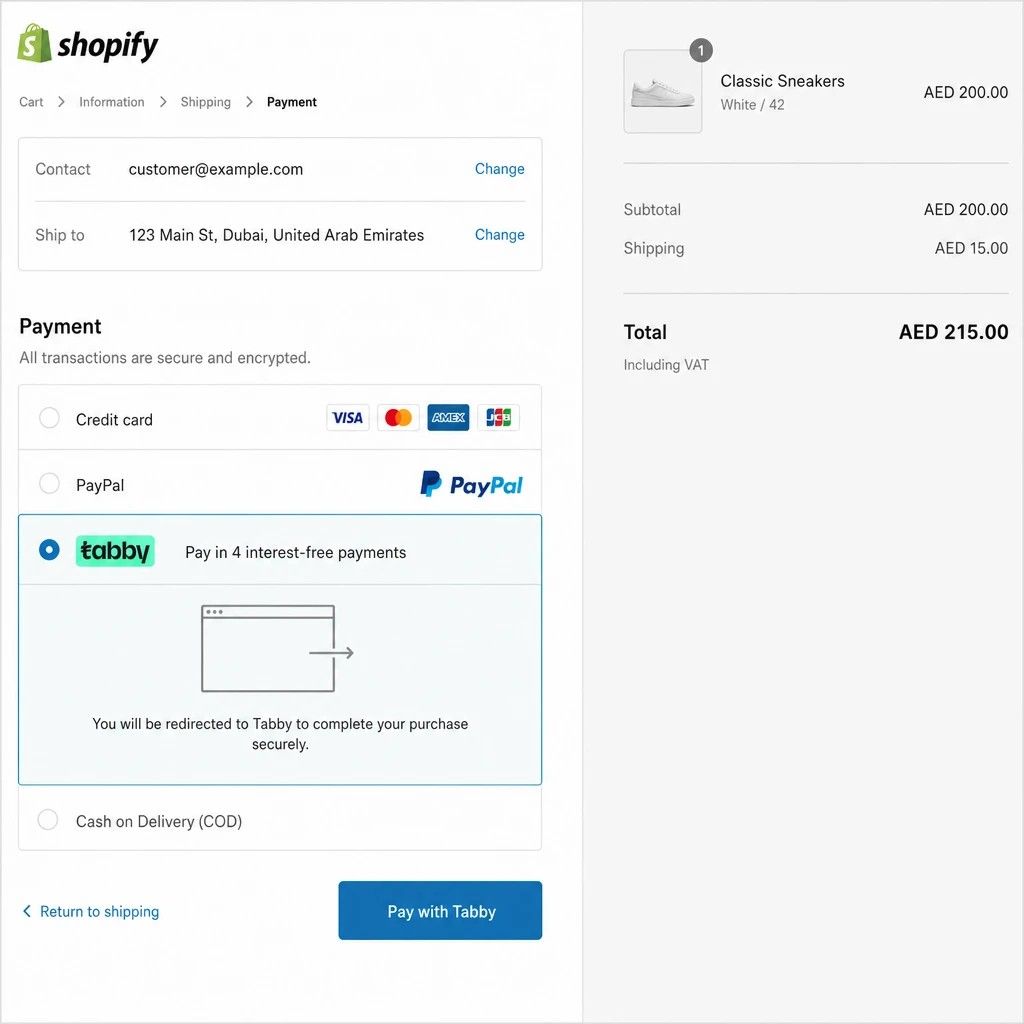
For example, a UAE shopper may add a higher-value item to the cart, reach checkout, and look for a flexible payment option before deciding whether to continue. If the Tabby payment method is missing, poorly configured, or not tested against your store's currency and market settings, that shopper may abandon the order. A proper tabby shopify integration uae setup gives your store a more reliable route from interest to completed checkout.
The service does not promise approval, higher sales, or specific conversion results, because those depend on your business, product range, traffic quality, pricing, and Tabby's own review. It does focus on the parts you can control: correct setup, clean testing, and a payment experience that feels consistent with the rest of your store.
Setup process from access to go-live
The integration is completed through a simple project flow so you know what is happening and what is needed from your side. Each step is designed to reduce delays, avoid preventable errors, and keep the launch practical.
- Store and payment review. Your Shopify store settings, active payment methods, markets, currency, and checkout configuration are reviewed. This helps identify whether Tabby is being added to a clean setup or whether there are existing issues to resolve first.
- Merchant readiness check. You confirm that your Tabby Business application, dashboard access, and required credentials are ready. Tabby's application guidance says merchants may need to provide details such as company name, business website, store location, contact details, and documents such as a trade licence, VAT certificate, and bank statement or cheque where required. (tabby.ai)
- Integration and configuration. Tabby is configured according to the available Shopify setup route and the credentials available in your merchant dashboard. Settings are checked carefully so the payment method appears where expected.
- Checkout and order testing. Test orders or checkout checks are run to confirm the customer journey. The goal is to verify that the shopper can reach the payment step, select Tabby, and return to the store order flow correctly.
- Handover and launch support. Once the setup is ready, you receive a practical handover. This can include what was changed, what your team should monitor, and what to do if Tabby updates settings, credentials, or approval details later.
Practical specifications
This is a service product rather than a downloadable app. It is built around your Shopify store, your UAE business setup, and your Tabby merchant account status.
| Area | What to expect |
|---|---|
| Platform | Shopify store setup for UAE ecommerce merchants |
| Payment focus | Tabby payment method configuration and testing |
| Region focus | UAE Shopify payments and AED-based selling considerations |
| Merchant requirement | Active or in-progress Tabby Business access, subject to Tabby approval |
| Store requirement | Access to Shopify admin and relevant payment configuration permissions |
| Testing | Checkout visibility, payment selection, and order-flow review |
| Pricing | Quote-based, depending on store complexity, current setup, and support required |
| Best fit | Merchants who want expert setup rather than trial-and-error configuration |
Tabby notes that AED is the accepted local currency for the United Arab Emirates within the countries where it operates, which is an important consideration for UAE store configuration. (tabby.ai) If your Shopify setup involves multiple markets, international currencies, or separate regional storefronts, those details should be reviewed before go-live.
Designed to work with your wider payment stack
Adding Tabby does not mean every other payment option becomes less important. Many UAE stores still need a balanced checkout that may include card payments, wallet options, Shopify Payments where eligible, cash on delivery, or other local gateways. The right mix depends on how your customers prefer to pay and how your operations handle fulfilment, refunds, cancellations, and support.
This service looks at Tabby as one part of your overall checkout strategy. If Shopify Payments is active in your UAE store, the Tabby setup should be reviewed in the context of that existing payment environment. If you use third-party gateways, the configuration should avoid confusing customers with too many overlapping choices or unclear labels.
The practical benefit is a cleaner payment experience. Customers who want to pay immediately can use your standard payment methods, while eligible shoppers who prefer flexible payments can see Tabby as an option at checkout. Your team gets a setup that is easier to explain, test, and maintain.
Support for store visibility and post-launch use
A successful integration should also prepare you for what happens after launch. Tabby's merchant resources describe a Merchant Dashboard with areas for orders, analytics, transaction tracking, payouts, disputes, store details, and catalogue listing, depending on the merchant setup and available features. (tabby.ai)
That matters because the payment method is not only a checkout button. Your team may need to review orders, understand refund handling, check payout information, or keep catalogue and store details current. If your products become eligible for Tabby app visibility or catalogue listing, keeping product data clean can support a better discovery experience.
Post-launch support can include checking whether the payment method is still visible after theme changes, Shopify updates, app changes, or market-setting edits. Many payment problems appear after a store owner installs a new app, changes checkout settings, or adjusts markets without retesting. A short review after major store changes can prevent small configuration issues from becoming lost orders.
Quote-based pricing for clean implementation
Pricing is provided by quote because not every Shopify store has the same checkout setup. A new UAE store with a simple theme and ready merchant credentials is different from a multi-market store with custom apps, existing payment conflicts, or previous failed setup attempts.
Your quote can reflect the work actually needed, such as initial review, configuration, testing, troubleshooting, documentation, or follow-up support. No fixed price is listed here because the most accurate cost depends on access, readiness, and complexity. That keeps the scope realistic and avoids charging for work your store does not need.
Start your Shopify Tabby integration
If your UAE Shopify store is ready to offer flexible payments, the next step is a quick setup review. Prepare your Shopify admin access level, Tabby Business status, current payment methods, store currency, and any checkout issues you have already noticed.
Request a quote for shopify tabby integration uae and get a clear implementation plan before changes are made. You will know what is required, what can be configured, what needs approval from Tabby, and how the payment method will be tested before launch.
E-CommerceShopify Instagram Integration in 2026: Setup, Tagging and CostsHow to connect Shopify to Instagram in 2026: the requirements, setup steps, product tagging, checkout, costs and fixes for common connection errors. E-CommerceMailchimp Shopify Integration in 2026: Setup, Cost and Best PracticesHow the official Mailchimp Shopify integration works in 2026: what syncs, how to set it up, what it costs and the automations to build first.
 E-CommerceHubSpot Shopify Integration in 2026: Setup, Sync Rules and ROIHow the HubSpot Shopify integration works in 2026: what syncs, how to set it up, the duplicate rules to know and how to use the data for better marketing ROI.
Tell us what the business needs. We will tell you what to build first.
Schedule a free consultation and get a written recommendation, with costs, before you commit to anything.
Get in touchPROVEN RESULTS
4.7 / 5verified reviews on Google