 E-CommerceShopify Tabby Integration UAEA done-for-you Shopify Tabby integration service for UAE merchants: setup support, configuration, checkout testing and handover.
Shopify Salesforce Integration for Better Efficiency
How a Shopify Salesforce integration cuts manual work: what it syncs, how to choose a connector, middleware or custom build, and who should own each piece of data.
A linked commerce stack helps teams move faster. Customer, order, product, and marketing data no longer sit in separate tools. With the right Shopify Salesforce integration, ecommerce teams can cut manual entry, improve customer view, and give sales, service, and marketing cleaner data to use. The goal is not just to link two tools. It is to build a steady flow of data that supports real work.
What does a Shopify Salesforce integration do?
A Shopify Salesforce integration links ecommerce activity in Shopify with customer, sales, service, or marketing work in Salesforce. In practice, that means Shopify data can feed Salesforce records, rules, lists, reports, and follow-up. Salesforce can also help manage customer data, account links, and life cycle work.
For a small store, this may be as simple as syncing new customers and orders into Salesforce. For a larger operation, the Shopify and Salesforce integration may need to handle several Shopify stores, Shopify Plus, Salesforce Sales Cloud, Service Cloud, Marketing Cloud, an ERP, warehouse tools, tax data, refunds, and complex customer links. That is why Salesforce and Shopify integration planning should start with process design, not connector choice.
The value of cleaner handoffs
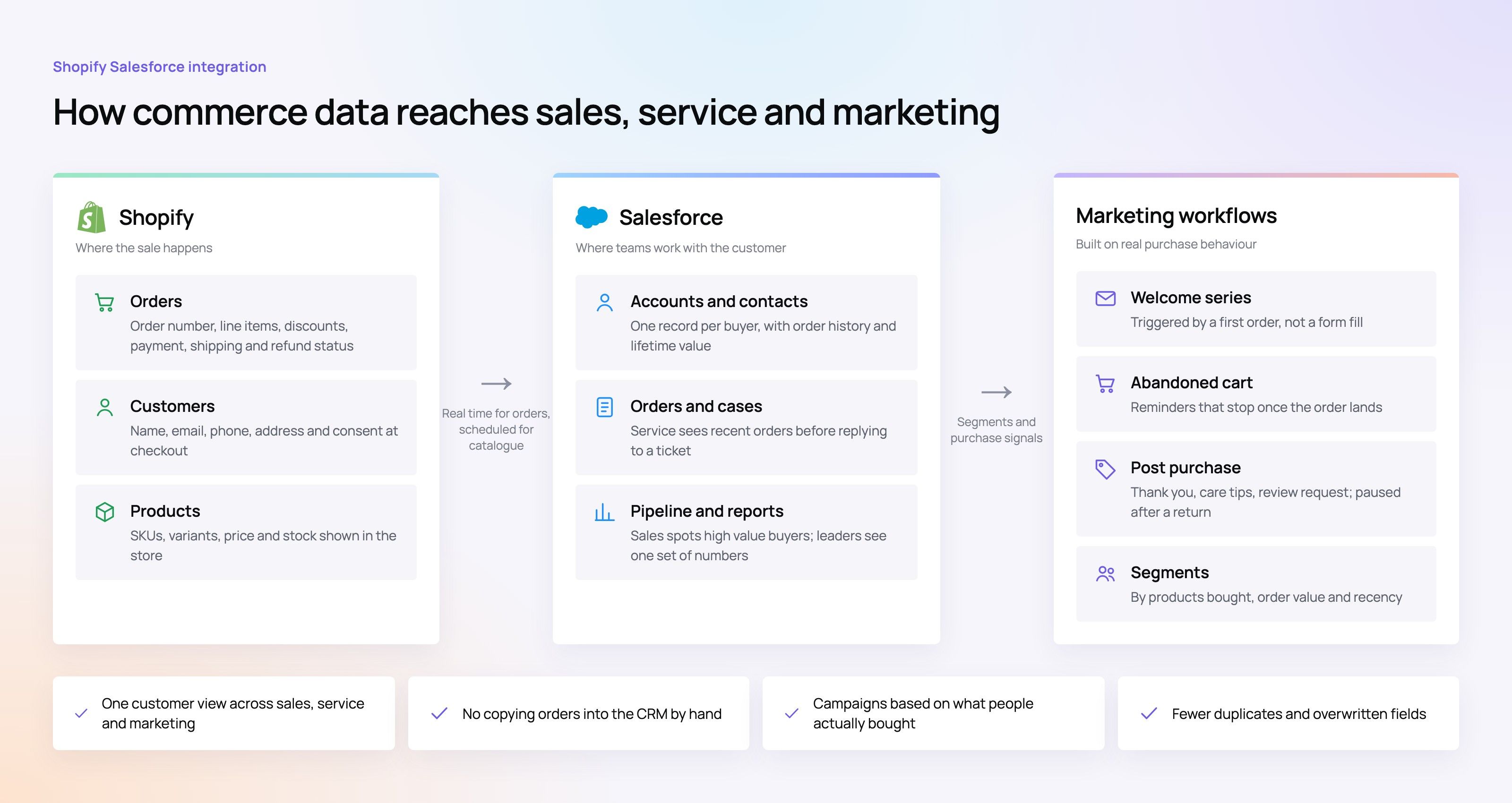
The biggest gain from Shopify and Salesforce integration is less repeat work and fewer mistakes. When teams copy order info into a CRM, export customer lists for campaigns, or manually match ecommerce and sales data, delays and errors are almost sure. A well-built integration turns those handoffs into set rules.
For example, customer service can see recent orders before they reply to a ticket. Sales can spot high-value ecommerce buyers and plan account outreach. Marketing can build lists from purchase behavior instead of old sheets. Finance and operations can cut confusion around payments, taxes, refunds, and shipping status when the right system gets the right update.
A practical data map often includes:
- Customer records: names, emails, phone numbers, addresses, consent preferences, and account links.
- Orders: order number, line items, discounts, shipping status, payment status, refunds, and returns.
- Products and inventory: SKUs, variants, pricing, stock, and product details that matter downstream.
- Marketing activity: purchase history, abandoned cart signals, campaign tags, and customer groups.
- Financial details: payment, tax, refund, and balance fields where needed.
This is where Salesforce data sync becomes more than a tech task. It becomes the base for faster calls and fewer blind spots.
Choosing the right integration method
No single best method exists for every business. The right choice depends on order volume, data shape, budget, internal skill, and how custom your Salesforce setup is. A small brand may need a simple connector. A large team may need a flexible integration platform or custom build.
Common approaches include:
- Prebuilt connectors and third-party apps. These are often the fastest path for standard use cases such as syncing customers, orders, and products. They can cut build time and give teams an easy setup, but they may fall short if your flows are highly custom.
- Integration platforms and middleware. Salesforce integration tools such as iPaaS platforms can support more complex flows, transform rules, logs, retries, and multi-system work. This is useful when Shopify, Salesforce, ERP, fulfillment, and marketing systems all need to stay in step.
- Custom API development. A custom Shopify API integration can give teams more control over data mapping, triggers, business rules, and edge cases. The tradeoff is ongoing care, docs, tests, and ownership. Our custom software team builds and maintains these links.
- ERP-first architecture. Some companies put the ERP at the center, especially when stock, price, customer terms, or financial balance data are owned there. In this model, Shopify and Salesforce both connect through one source of truth instead of pushing clashing updates to each other. This is common with Microsoft Dynamics 365 and Odoo.
For many businesses, the best path is not connector versus custom. It is a layered plan: use standard links where they work, add custom work where the process truly needs it, and avoid brittle workarounds for core rules.
Which Salesforce and Shopify integration option fits your business?
The best Salesforce Shopify integration option is the one that fits your current size and still leaves room to grow. If your store has basic order flows and a clean Salesforce setup, a connector may be enough. If you handle high order volume, multiple brands, B2B accounts, complex shipping, or heavy custom objects, middleware or custom work is often the better fit.
Use this decision framework before you pick a tool:
| Business situation | Likely fit | What to watch |
|---|---|---|
| Small team syncing basic customers and orders | Prebuilt connector | Field limits, duplicate handling, and upgrade path |
| Growing brand with marketing automation needs | Connector plus workflow automation | Consent, segment rules, and campaign data quality |
| Multi-store or Shopify Plus environment | Middleware or advanced connector | Store mapping, brand rules, and report consistency |
| B2B or account-based commerce | Custom mapping or iPaaS | Contacts, accounts, price lists, terms, and owner conflicts |
| ERP-led operations | ERP-first integration | Stock accuracy, financial fields, and master data rules |
This is also where Shopify Plus Salesforce integration needs extra care. Shopify Plus can support more complex commerce work, but it does not fix CRM design by itself. Teams still need to decide which system owns customer records, how orders show up in Salesforce, and how exceptions are handled.
Data ownership matters more than data movement
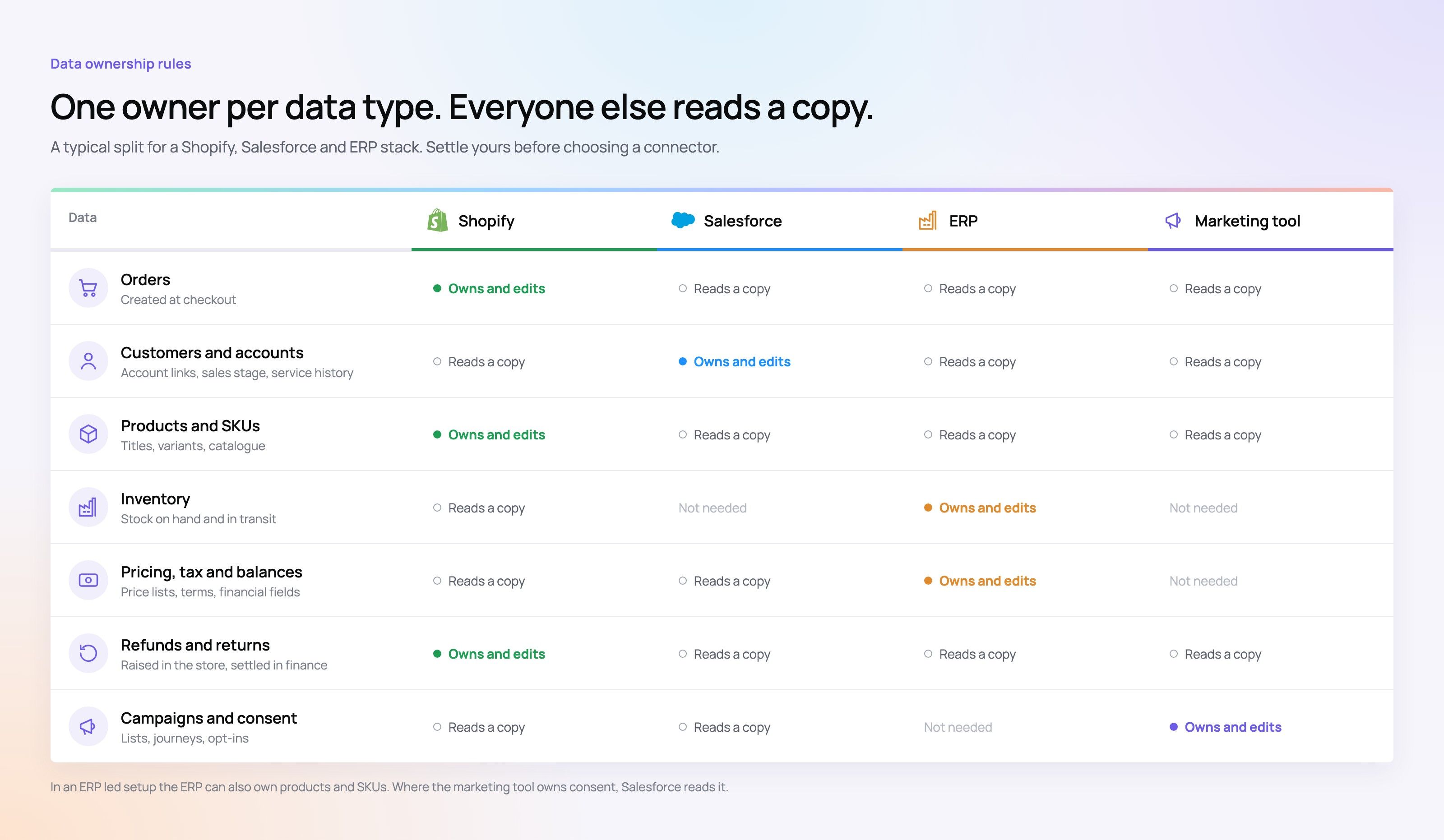
A common mistake in Shopify CRM integration projects is to assume that more data is always better. In truth, too much or poorly managed sync can create duplicates, overwrite key fields, or fire automations at the wrong time. Before you connect tools, define the source of truth for each data type.
For example, Shopify may own order data because it is closest to the sale. Salesforce may own account links, sales stages, service history, and life cycle fields. An ERP may own stock, price, tax, and financial balance data. Marketing Cloud or another marketing tool may own campaign work and consent data, depending on your stack.
A simple governance checklist can prevent costly cleanup later:
- Identify the system of record for each object and field.
- Decide whether each sync should be one-way or two-way.
- Separate live events from batch updates.
- Define rules for duplicates, guest checkouts, merged accounts, and email changes.
- Document what happens when a sync fails.
- Assign ownership for monitoring, updates, and troubleshooting.
When the rules are clear, Salesforce integration with Shopify becomes easier to keep up because teams know which tool should win when data conflicts appear. If you are moving customer data into Salesforce for the first time, plan it as a CRM migration before you switch on the sync.
Scale brings workflow exceptions
A simple demo can make any integration look easy: a customer places an order, the order appears in Salesforce, and everyone is happy. Real commerce is messier. Customers return items, split shipments happen, products go out of stock, taxes change, discounts shift, and guest buyers later become registered customers.
At scale, these cases matter because they affect service quality and report accuracy. A service agent needs to know whether an order was refunded, partly shipped, or replaced. A sales rep needs to know whether a customer is an active buyer or a one-time buyer. A marketing team needs to avoid sending the wrong note after a return or cancel.
Strong Shopify integration with Salesforce should cover these cases. That may mean exception queues, retry logic, alerts, manual review steps, or status maps that match the real shipping path. It may also mean not syncing in real time when a scheduled batch is safer and more stable.
How do you keep the integration reliable after launch?
You keep the integration reliable by treating it like a live system, not a one-time setup. After launch, teams need monitoring, ownership, docs, tests, and a change path for new fields, apps, automations, stores, and Salesforce custom work.
Post-launch care should include regular checks for failed syncs, duplicate records, stale maps, and odd automation behavior. If a Shopify app changes checkout data or a Salesforce admin adds a required field, the integration may need a fix. Without monitoring, these issues can hurt reports, service, and revenue work.
A steady maintenance routine includes:
- Daily or weekly sync review: Check failed jobs, queue backlogs, and high-priority errors.
- Change control: Review Salesforce field changes, Shopify app updates, and workflow edits before they reach production.
- Data quality checks: Watch duplicate contacts, missing order fields, mixed SKUs, and mismatched customer IDs.
- Exception reporting: Give business users a view into records that need manual review.
- Sandbox testing: Test new mappings, automations, and schema changes before rollout.
- Clear escalation paths: Define who owns connector settings, APIs, middleware, Salesforce automation, and Shopify setup.
This work is even more important when using custom APIs. A custom build can be strong, but it should never depend on hidden logic known by only one developer.
Practical best practices for a smoother project
A good Salesforce integration with Shopify starts with business fit. Tech teams can build the link, but business teams must define what correct data looks like, which flows matter, and which edge cases are okay. The more clearly these choices are made upfront, the fewer surprises show up after launch.
Before implementation, bring in people from ecommerce, sales, service, marketing, finance, and operations. Ask each team what data they need, when they need it, and what they will do with it. Then focus the integration on the flows that create clear value, such as faster service replies, better customer groups, fewer manual updates, or cleaner finance matching.
Helpful project rules include:
- Start with the most important objects instead of syncing everything at once.
- Keep field mapping clear and documented.
- Use unique IDs wherever possible to cut duplicate records.
- Design for returns, cancellations, and guest checkout from the start.
- Avoid triggering needless Salesforce automation on every ecommerce update.
- Create dashboards or alerts for failures rather than relying on users to spot issues.
- Revisit the integration as order volume, product mix, or team setup changes.
The best Shopify Salesforce integration projects are not the flashiest. They are the ones that keep data steady, support daily work, and make growth less messy. If HubSpot or Mailchimp is your CRM or email tool instead, see our guides to the HubSpot Shopify integration and the Mailchimp Shopify integration.
The takeaway
Salesforce and Shopify can work together as a strong commerce and customer system, but only when the integration is designed around real workflows. Connectors, middleware, ERP-first plans, and custom APIs all have a place; the right choice depends on size, scale, and governance needs.
If your team is planning a Salesforce and Shopify integration, start by defining ownership, mapping key data, and finding the processes that cause the most friction today. A thoughtful Shopify Salesforce integration can cut manual work, improve customer view, and give every team a more steady view of what is happening across the business. Our Shopify developers and sales automation team can scope it with you; talk to us about your stack.
Frequently asked questions
Start with the business flow and the data owners.
Integration planning should begin with process design, not connector choice. First map the key workflows, the data objects that matter most, and which system owns each field. Then choose between a prebuilt connector, middleware, an ERP-first setup, or custom code.
E-CommerceShopify Tabby Integration UAEA done-for-you Shopify Tabby integration service for UAE merchants: setup support, configuration, checkout testing and handover. E-CommerceShopify Instagram Integration in 2026: Setup, Tagging and CostsHow to connect Shopify to Instagram in 2026: the requirements, setup steps, product tagging, checkout, costs and fixes for common connection errors.
 E-CommerceMailchimp Shopify Integration in 2026: Setup, Cost and Best PracticesHow the official Mailchimp Shopify integration works in 2026: what syncs, how to set it up, what it costs and the automations to build first.
Tell us what the business needs. We will tell you what to build first.
Schedule a free consultation and get a written recommendation, with costs, before you commit to anything.
Get in touchPROVEN RESULTS
4.7 / 5verified reviews on Google